Best music store POS software

The Best Music Store POS Software Depends on Which Half of the Problem You Have

Every guide to music store POS software makes the same mistake: it treats the till and the back office as one purchase. They are not. A shop that needs fast checkout and card processing has genuinely different requirements from one tracking vintage guitars, a school rental fleet and a repair bench. This page separates the two, names the strongest option in each, and is honest about where we do and do not belong.

  • Best for card processing and checkout: Square
  • Best for multi-location retail basics: Lightspeed
  • Best music-specific full terminal: AIM POS or Music Shop 360
  • Best for serialized instrument inventory: Music Shop Suite
  • Best for rentals, repairs and lessons: Music Shop Suite
  • Best value back office: Music Shop Suite at $49/month flat

If you need a payment terminal

For fast, reliable checkout with integrated card processing, these are the honest recommendations — none of which are us.

  • Square — best for small shops: easy setup, good hardware, transparent rates
  • Lightspeed — best for multi-location and stronger purchasing tools
  • AIM POS — built for music retail with good vendor catalogue integration
  • Music Shop 360 — full-featured music retail terminal with deep catalogue support

If you need serialized inventory

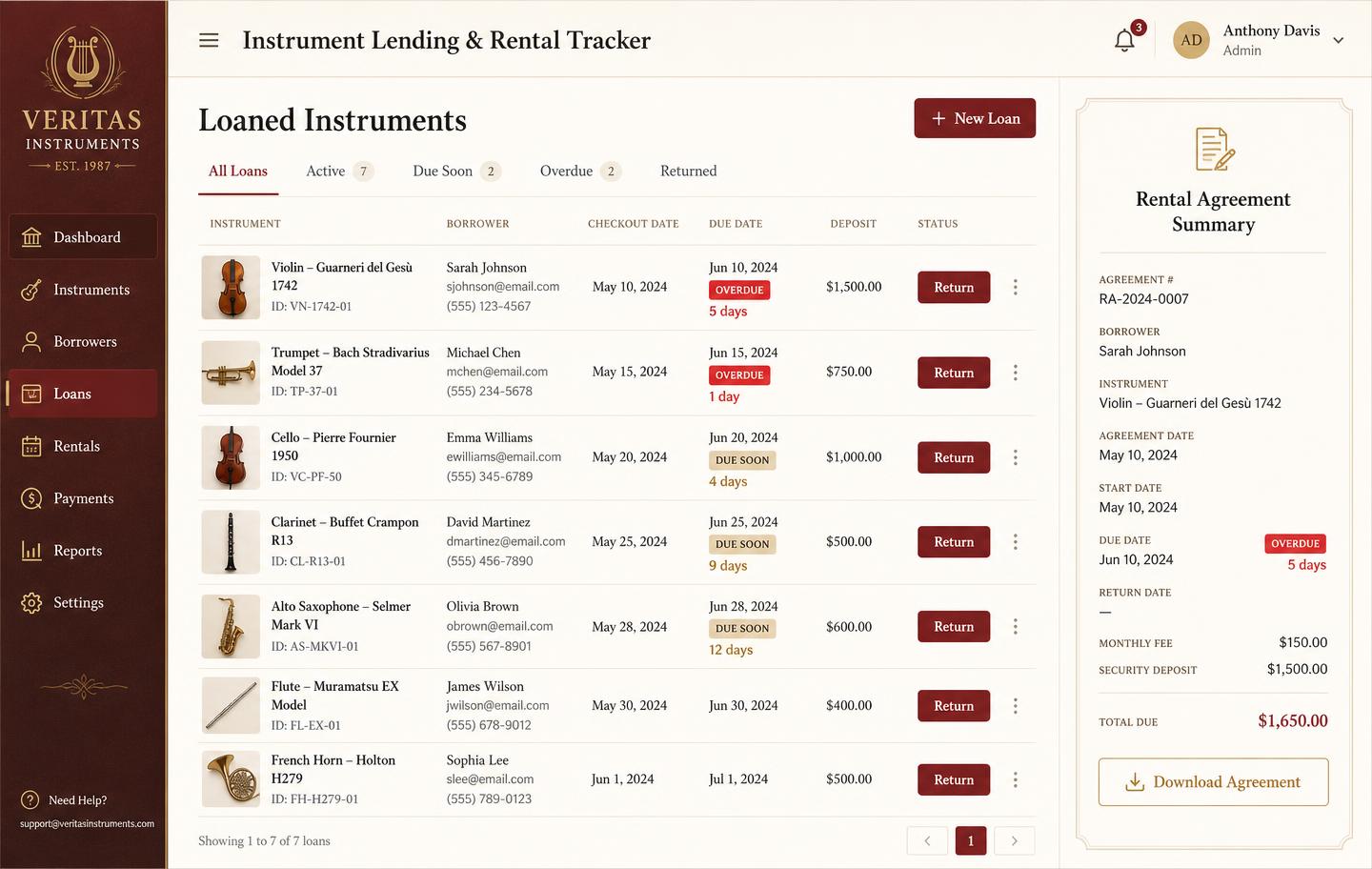
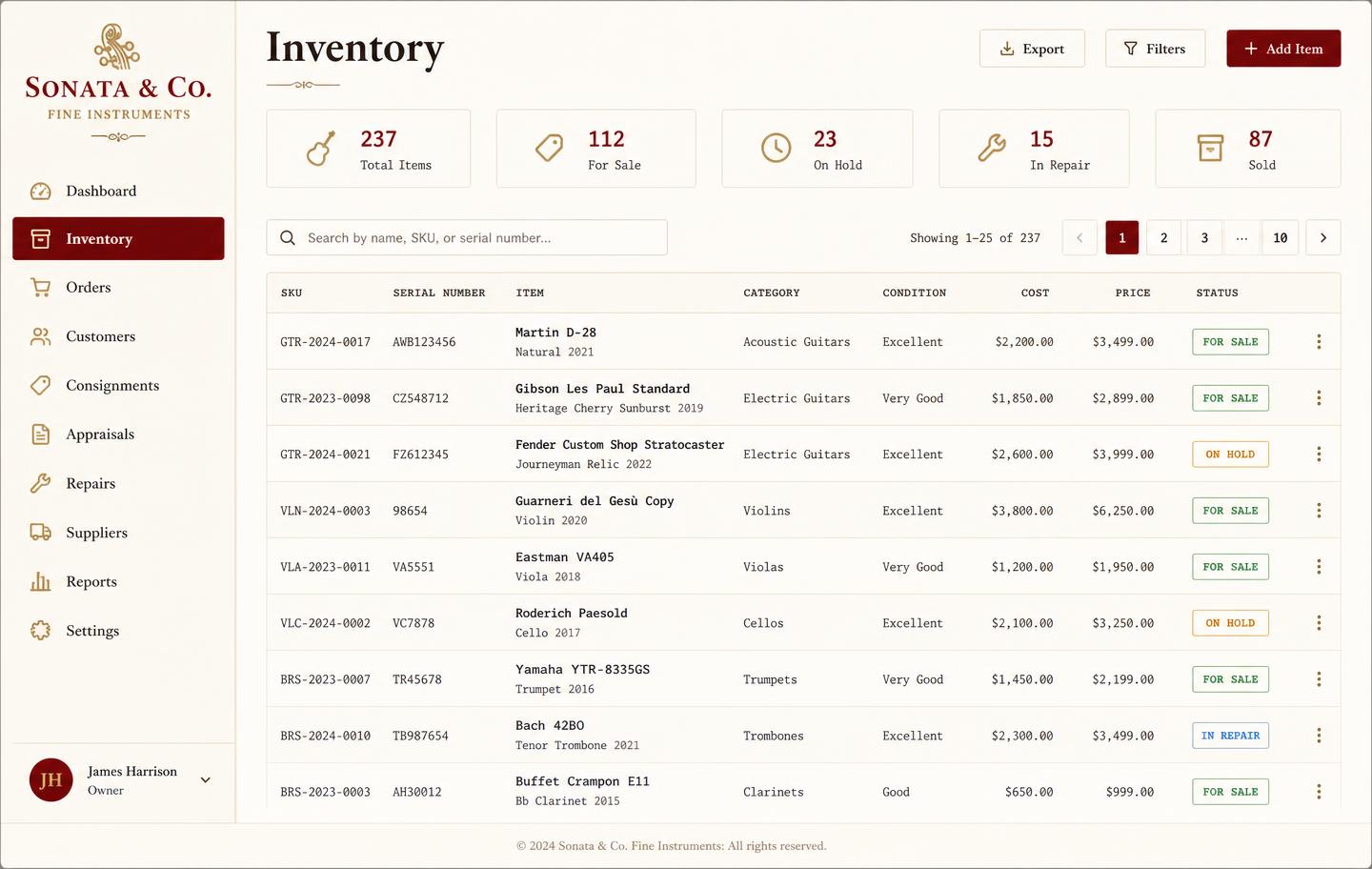
Most retail systems track SKUs and quantities. Music shops need per-unit records: serial number, condition grade, cost basis, photographs and history. Every instrument is tracked individually from acquisition through loans and repairs to sale.

  • One record per physical instrument
  • Condition grades and photographs per unit
  • Repair costs attached to the instrument they were spent on

If you run rentals or a school programme

A rental is not a transaction, it is a relationship with a due date. Contracts, deposits, condition at dispatch and return, renewals and overdue chasing all need to be first-class, which they never are in a system built around a checkout.

If you have a repair bench

Work orders with parts, labour, technician queues and customer updates. The repair attaches to the instrument, so a unit's total cost of ownership is visible rather than buried in workshop overheads.

If you teach lessons

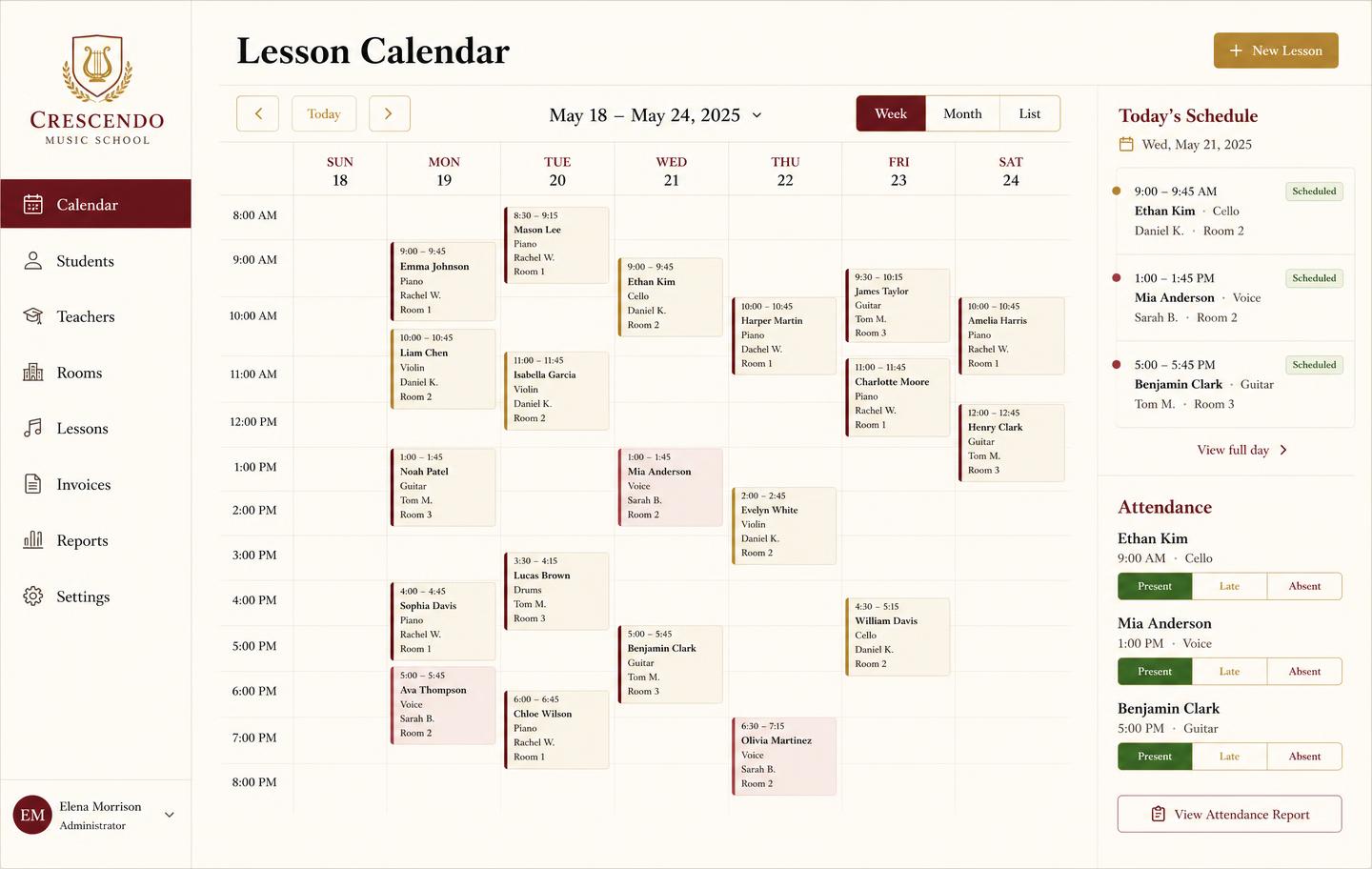
Lesson scheduling needs students, teacher availability, rooms, recurring bookings and attendance that feeds invoicing. That is a different problem from booking a haircut, and generic appointment tools model it badly.

If you need real numbers

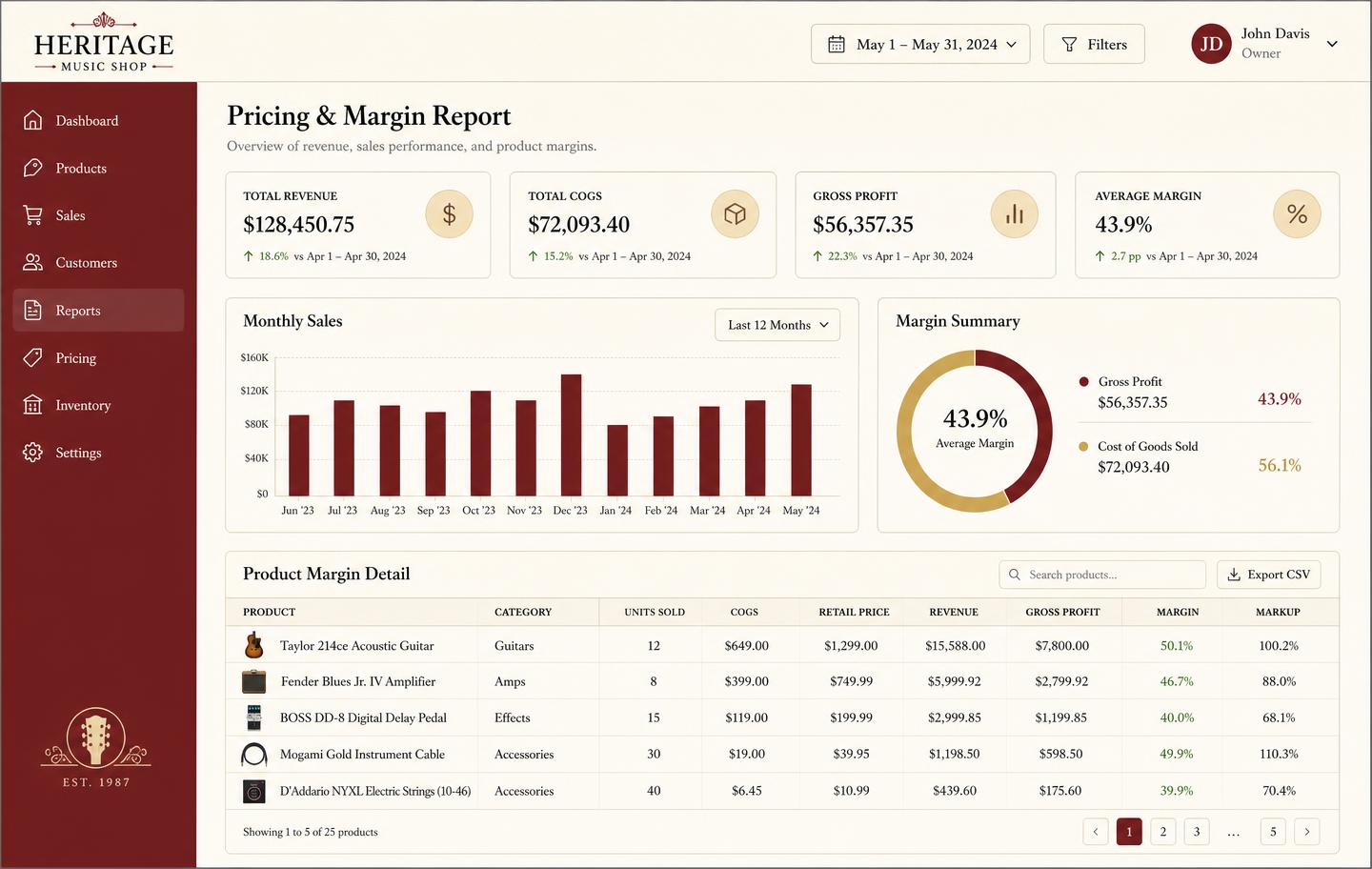
Sales totals from a till are not enough. You need profit and loss across all four income streams, live inventory valuation, stock ageing, rental utilisation and exports your accountant will accept without re-keying.

Music store POS software compared

The four terminal systems most often shortlisted by independent music shops, and where a back-office system fits alongside them.

Music store POS software compared
SystemStrongest atSerialized unitsRentals & repairsLessons
SquareSimple checkout, cheap hardware, fast setupNoNoNo
LightspeedMulti-location retail, purchasing, reportingLimitedLimitedNo
AIM POSMusic-specific retail, vendor cataloguesPartialPartialPartial
Music Shop 360Full music retail terminal, deep cataloguePartialYesPartial
Music Shop SuiteBack office: stock, rentals, repairs, lessons, marginYesYesYes

Terminal pricing varies by hardware, location count and processing rate. Music Shop Suite is $49/month flat with unlimited users; it does not process card payments.

Why 'music store POS' is two products with one name

The phrase point of sale describes a moment: a customer, a counter, a payment. Software named after that moment is optimised for it — speed, reliability, hardware integration, and getting the card payment through with as few taps as possible. Judged on that job, modern terminals are excellent and remarkably cheap.

The trouble is that music shops adopted the phrase to mean something larger. When an owner says they are looking for a new POS, they usually mean the whole operating system of the business: what stock exists, what it cost, what is out on hire, what is on the bench, who is teaching at four o'clock, and whether the month made money. Only a fraction of that happens at the counter.

So the market has two products with one name, and buyers routinely purchase the wrong one. They buy a terminal expecting it to solve inventory and discover a year later that the spreadsheet never went away. Being precise about which half you are buying is the single most useful thing you can do before comparing anything.
The four things generic retail software cannot model

Serialization is first. General retail assumes interchangeable units — five of a SKU are five of a SKU. Music retail rarely works that way, because condition, provenance and cost differ per instrument. Workarounds exist, usually creating a separate product for every unit, and they collapse under their own weight within a few hundred items.

Recurring revenue is second. A rental generates money monthly, requires a contract, holds a deposit, and ends with a physical object returning in some condition. A checkout-shaped system has no concept for any of that, so rentals end up in a spreadsheet with due dates nobody watches.

Repairs are third. A work order is a small project: intake, diagnosis, parts, labour, approval, completion, collection. It has a queue, a technician and a customer waiting for news. Retail software has no equivalent object, so it becomes paper tickets on a hook.

Teaching is fourth, and the furthest from retail of all. Recurring weekly slots, rooms, attendance, make-up credits and tuition invoicing share almost nothing with selling a product across a counter.

What a terminal plus a back office actually costs

Shops are often surprised that running two systems is cheaper than one. The arithmetic works because full music retail suites price for the whole problem, typically with per-terminal or per-user components and modules for rentals or lessons charged separately.

A representative independent shop pays somewhere between sixty and two hundred dollars a month for a terminal with processing, depending on volume and hardware. Adding a flat forty-nine dollar back office on top usually lands below the price of a single all-in-one suite quoted for the same feature set, and it avoids replacing hardware that works.

The other advantage is exit cost. Two loosely coupled systems can be changed one at a time. If your terminal stops suiting you, you swap the terminal. If your back office does, you swap that. A single suite makes every dissatisfaction into a full migration, which is why shops stay on systems they dislike for a decade.

How to shortlist without wasting a month on demos

Start by writing down the last five administrative problems that genuinely cost you time or money. Not features — problems. An instrument that could not be found, a rental returned damaged with no record of its condition, a repair the customer was never called about, a month where the margin looked wrong.

Then sort them by where they happened. Anything at the counter is a terminal problem. Anything involving an object, a due date, a bench or a timetable is a back-office problem. Most shops find the list is heavily weighted to one side, and that tells you which purchase is urgent.

Finally, test the awkward case rather than the demo case. Ask any system how it handles two identical models with different conditions and costs, a rental that comes back a week late with a cracked case, or a lesson credited as a make-up after the invoice ran. The answers to those three questions separate systems more reliably than any feature grid.

See the workbench before you sign up

Inventory, pricing, lesson bookings, and instrument lending all live in the same back-office dashboard — no separate apps, no re-keying between them.

Music shop inventory dashboard listing instruments with SKU, serial number, condition, cost, price and status
InventoryEvery instrument tracked by SKU and serial with condition, cost, retail price, and live status — for sale, on hold, in repair, or sold.
Pricing and margin report showing revenue, cost of goods, gross profit and per-product markup
Pricing & marginRevenue, cost of goods, gross profit, and markup per product so you price from real numbers instead of gut feel.
Instrument lending and rental tracker with borrowers, due dates, overdue badges and deposits
Instrument lendingLoans and rentals by unit: who has it, when it is due, what deposit is held, and which agreements are overdue.
Weekly lesson booking calendar with student lessons, teachers, rooms and attendance
Lesson bookingsA weekly teaching calendar with rooms, teachers, and attendance marking — plus the invoice that follows each lesson block.

Honest note

Honest note: we are not a payment terminal.

If you are shopping for a till — card readers, cash drawers, barcode scanners, fast checkout — we are not it, and no amount of marketing should convince you otherwise. Square, Lightspeed, AIM POS and Music Shop 360 are better choices for that job. Music Shop Suite is the back-office operating system that sits behind the terminal: serialized inventory, rentals, repair work orders, lesson scheduling and accounting reports. Plenty of shops run both, and that is the configuration we recommend.

Frequently asked

What is the best music store POS software?
There is no honest single answer, because music shops buy two different things and call them both POS. If you mean the till — card processing, receipts, a cash drawer — Square, Lightspeed and AIM POS are the strongest options. If you mean the system that tracks serialized instruments, rentals, repairs, lessons and margin, that is a back-office system, and Music Shop Suite is built for exactly that at $49/month.
Can I use Music Shop Suite alongside my existing POS?
Yes, and most of our users do. They keep their payment terminal for checkout and run inventory, rentals, repairs, lessons and reporting in Music Shop Suite. You are not asked to rip out hardware that already works.
How much does music store POS software cost?
Terminal-based systems typically run from around $60 to $200+ per month per location once hardware, payment processing and add-on modules are counted. Music Shop Suite is $49/month flat with unlimited users and no hardware, because it is not a terminal.
Do I need music-specific software, or will a generic retail POS do?
A generic retail POS handles the till perfectly well. Where it fails is everything unique to music retail: serial numbers, condition grading, rental contracts, repair work orders, lesson scheduling, and consignment splits. Those are not settings you can configure into a general system.
What makes music retail different from other retail?
Four things: stock is serialized rather than counted, a large share of revenue is recurring rather than transactional, instruments come back for repair, and many shops teach. A system designed around a checkout transaction models none of those well.
Is there a free trial?
No. Music Shop Suite is $49/month flat with no trial and no contract. If it does not fit, cancel and you keep access to the end of the billing period.

Sign up today

Run your shop on one workbench — starting today.

$49/month, no contracts, no trial. Import your spreadsheet, invite your team, and have inventory, repairs, rentals, and lessons in one place tonight.