Music school management software

Music School Management Software for Lessons, Tuition and Instruments

A music school is three businesses wearing one coat: a teaching timetable, a billing operation, and a small instrument fleet that keeps leaving the building. Music Shop Suite runs all three from one workspace — enrollment and rosters, per-teacher and per-room scheduling, tuition invoicing, and every school-owned instrument tracked by serial number.

  • Per-teacher and per-room calendars with conflicts blocked at save
  • Student and family records with balances and lesson history
  • Tuition invoicing and payment tracking per family
  • Serialized tracking for school-owned and rented instruments
  • Repair tickets when a school instrument comes back damaged
  • One flat $49/month for unlimited students and teachers

Enrollment and rosters

Every student has one record: their teacher, instrument, lesson slot, family contacts, and outstanding balance. Search by family so siblings roll up into one household rather than three near-duplicates.

  • Family grouping for multi-child households
  • Lesson history and attendance per student
  • Waitlists for full teacher schedules

Scheduling that respects rooms

Most lesson apps schedule teachers and ignore rooms. With four studios and nine teachers, the room is the binding constraint — so it is validated on every booking rather than discovered at 4pm on a Tuesday.

  • Per-teacher weekly recurring slots
  • Room assignment on every booking
  • Group classes and ensembles alongside private lessons

Instruments the school owns

Schools accumulate instruments: a rental fleet, loaners, ensemble gear that nobody has audited in four years. Each unit gets a serialized record with condition notes, the student holding it, and its full repair history.

  • Serial, condition and location per unit
  • Check-out and return tied to the student record
  • Repair tickets with parts and labour

Money in one ledger

Tuition, rental income, repair labour and any retail sales land in the same accounting ledger, so the profit-and-loss report reflects the whole school rather than just lesson fees.

  • Revenue split by stream and by term
  • Teacher pay rates and lesson revenue per instructor
  • Period exports your bookkeeper will accept

What a music school actually has to track

Schools usually start with a scheduling tool and bolt spreadsheets onto it. Here is where each approach holds and where it gives way.

What a music school actually has to track
What the school tracksScheduling app + spreadsheetsMusic Shop Suite
Lesson timetableHandledHandled
Room availabilitySpreadsheet or memoryEnforced on every booking
Attendance registerSeparate sheet per teacherOn the booking itself
Tuition invoicingManual from the registerGenerated from attendance
Family grouping for siblingsDuplicated recordsOne household record
School-owned instrument fleetSpreadsheetSerialized records
Who has which clarinetAsk the officeOn the student card
Repair history per instrumentPaper folderAttached to the unit
Whole-school P&LRebuilt each termContinuous

The three systems most music schools are actually running

Walk into almost any independent music school and you will find the same architecture, unplanned and identical everywhere. There is a scheduling tool holding the timetable. There is a spreadsheet holding the instrument fleet, usually maintained by one person who is quietly indispensable. And there is a third place — an accounting package, a shoebox, or a bank statement — where money is understood after the fact.

Each of these works. The problem is that they share entities they cannot share data about. A student exists in the scheduler. The clarinet that same student rents exists in the spreadsheet. The tuition and the rental fee exist in the accounts. Nothing links them, so every question that crosses a boundary becomes manual work.

The questions that cross boundaries are, unfortunately, the important ones. Which families are behind on both tuition and rental? Which instruments are out with students who left in December? What did the string programme actually earn once you count the fleet's repair bill? None of those can be answered by a system that only knows about lessons.
Why the instrument fleet is the part that fails first

Timetables self-correct. If a lesson is scheduled wrongly, a parent phones within the week and the error is fixed. Instrument records have no such feedback loop, which is why a fleet spreadsheet decays silently and continuously.

The decay follows a predictable pattern. An instrument goes out and is logged. It comes back early and nobody updates the row. It goes out again to a different student and gets a second row. Someone repairs it and records that in a different file. Three years later the school owns forty-one flutes according to the insurer, thirty-four according to the spreadsheet, and an unknown number in reality.

Serialized tracking fixes this not by being more careful but by removing the opportunity for divergence. The instrument is one record. Checking it out to a student is an event on that record, not a new row. The repair attaches to the same unit. There is no second place for the truth to live, so there is no second version of it.

Tuition invoicing and the attendance gap

Schools bill tuition in one of two ways: a flat termly fee, or a fee that reflects lessons delivered. The first is simpler and increasingly unpopular with families. The second is fairer and creates an enormous amount of administrative work — unless attendance and invoicing are the same system.

The work comes from translation. A teacher's register has to become an invoice line, usually via a spreadsheet, usually by one administrator, usually in the last week of term. Every step is a chance for a lesson to be counted twice, missed entirely, or charged after it was credited as a make-up.

When the invoice is generated from the attendance marks themselves, that translation disappears. The administrator's job changes from reconstructing what happened to reviewing a number that was already correct. It is the single largest time saving most schools get from consolidating, and it scales with the size of the roster.

Choosing between a lesson platform and a school system

There is a real category difference worth understanding before choosing. A lesson platform is built for a teaching studio: scheduling, student records, tuition collection, and often a parent-facing portal. Those tools are mature and, for a teaching-only studio, frequently the right answer.

A school system assumes the institution owns things. It expects a fleet, a repair bench, and a set of assets whose condition and location matter as much as the timetable does. That assumption changes the data model, not just the feature list.

The practical test is simple: count how much of your administrative pain involves a physical object. If the answer is almost none, a dedicated lesson platform will serve you better and we will say so. If the answer is a third or more — instruments out with students, repairs mid-term, an annual audit nobody enjoys — a school system is the correct shape, and running the timetable inside it costs nothing extra.

What music school management software should cost

Almost every platform in this category prices per student, per teacher, or per active enrollment. That model is comfortable for the vendor and quietly punitive for the school, because the bill grows exactly when the term intake grows — the moment cash is tightest and administration is heaviest.

It also distorts behaviour. Schools archive students they should keep, avoid adding a summer intake to the system, or keep the second campus in a spreadsheet to stay under a tier. The software ends up describing a smaller school than the one that exists, which defeats the purpose of having it.

Music Shop Suite is $49/month flat: unlimited students, unlimited teachers, unlimited instruments, every module included. A forty-student studio and a four-hundred-student school pay the same, so growing the roster is never a software decision. There is no free trial and no contract — cancel whenever, keep access to the end of the period.

Migrating a school mid-year without losing the term

Schools rarely get to switch systems in a quiet month, so the sensible approach is staged rather than clean-break. Start by importing students, families and teachers from CSV — those are stable records that do not change during a term and can be loaded weeks before you rely on them.

Next, load the instrument fleet, because it is the part no existing system holds properly and therefore the part with nothing to break. Even if the timetable stays where it is for another six weeks, having every school-owned unit serialized with its current holder is immediately useful and independent of the scheduling switch.

Only then move the timetable, ideally at a term boundary so recurring slots are created once rather than reconciled. Run the old scheduler read-only for a fortnight as a safety net. By the time you turn it off, the school's records, fleet and money already live in one place, and the calendar is the last thing to arrive rather than the first thing to risk.

See the workbench before you sign up

Inventory, pricing, lesson bookings, and instrument lending all live in the same back-office dashboard — no separate apps, no re-keying between them.

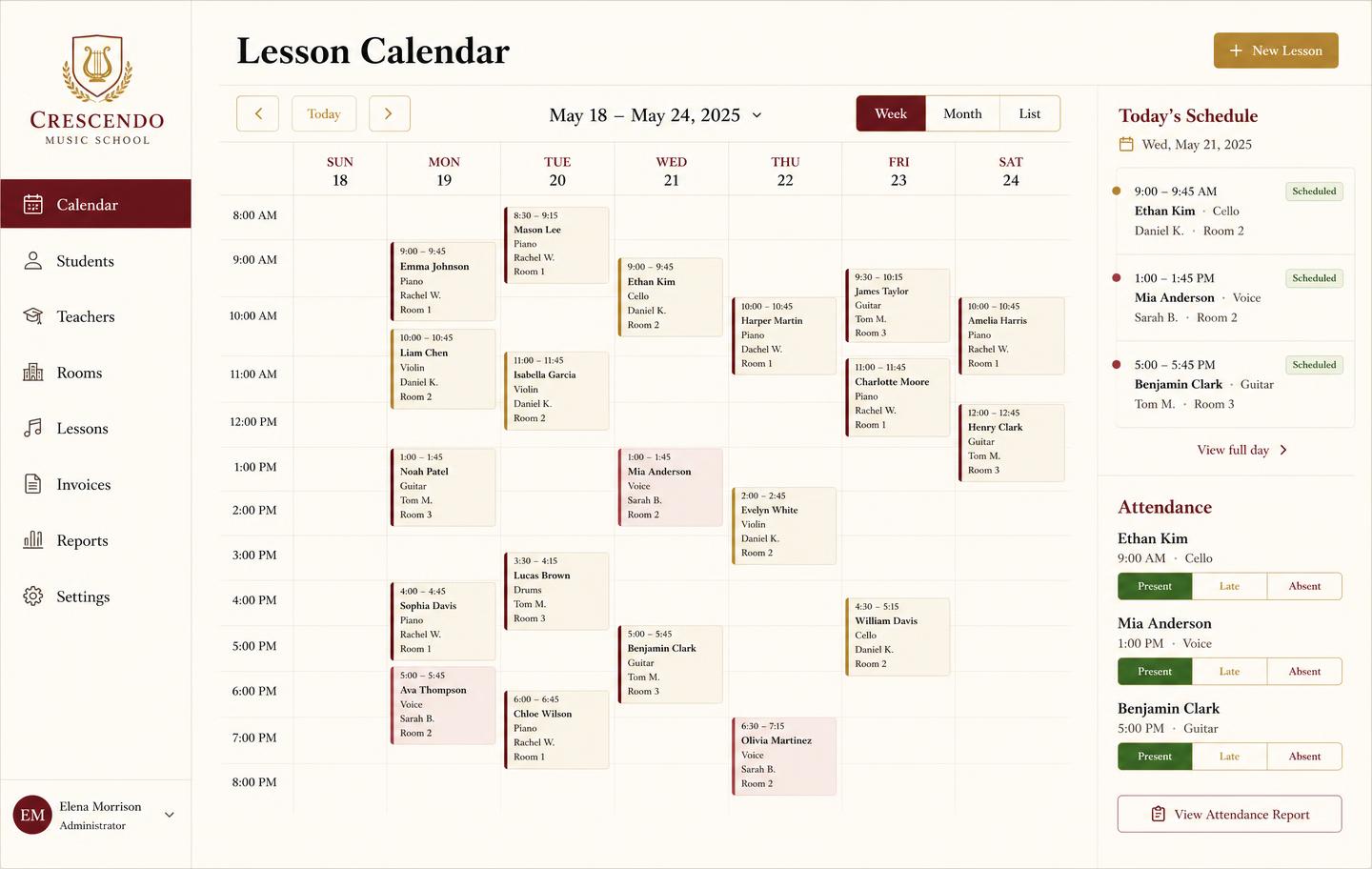
Weekly lesson booking calendar with student lessons, teachers, rooms and attendance
Lesson bookingsA weekly teaching calendar with rooms, teachers, and attendance marking — plus the invoice that follows each lesson block.
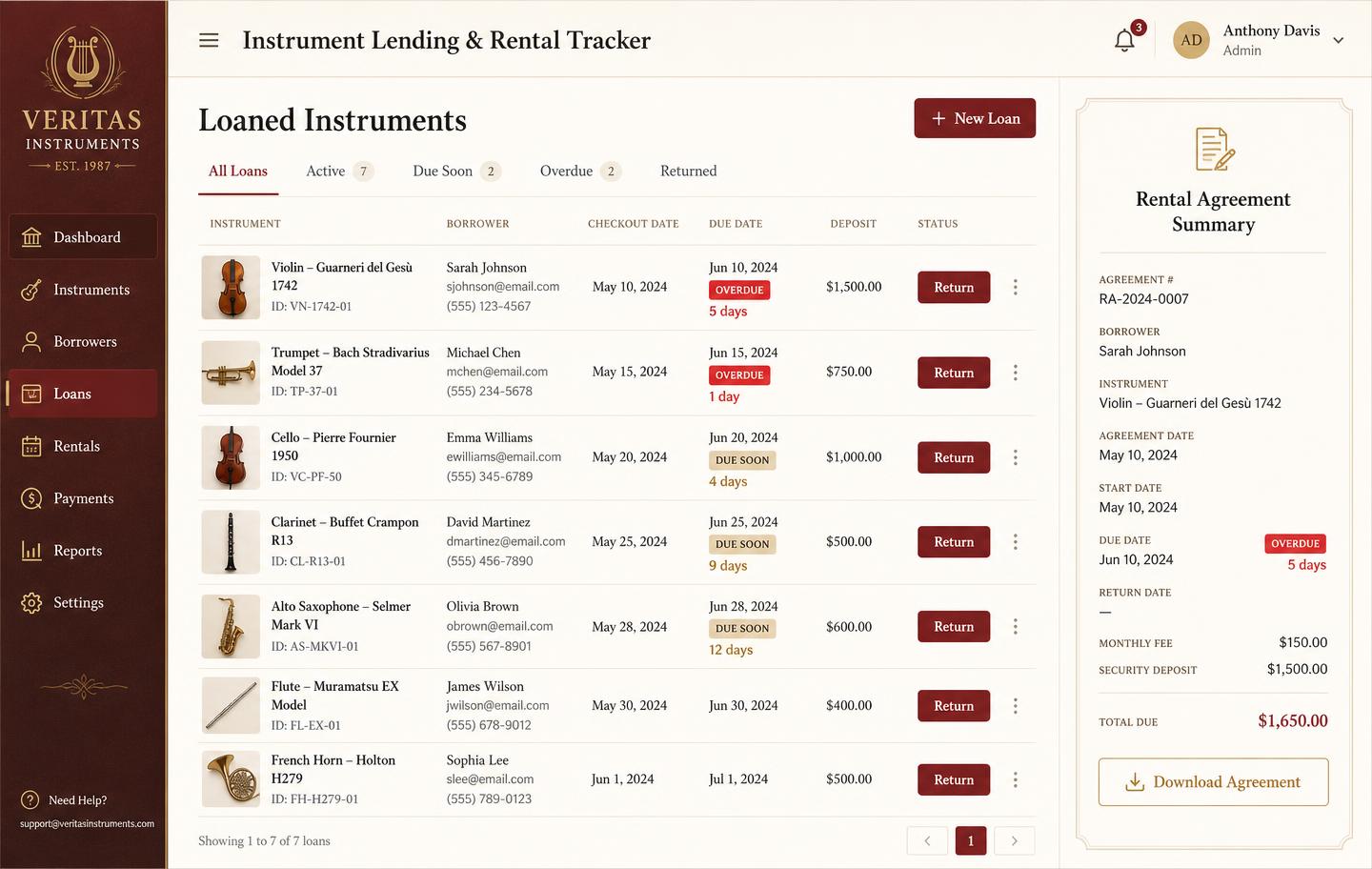
Instrument lending and rental tracker with borrowers, due dates, overdue badges and deposits
Instrument lendingLoans and rentals by unit: who has it, when it is due, what deposit is held, and which agreements are overdue.
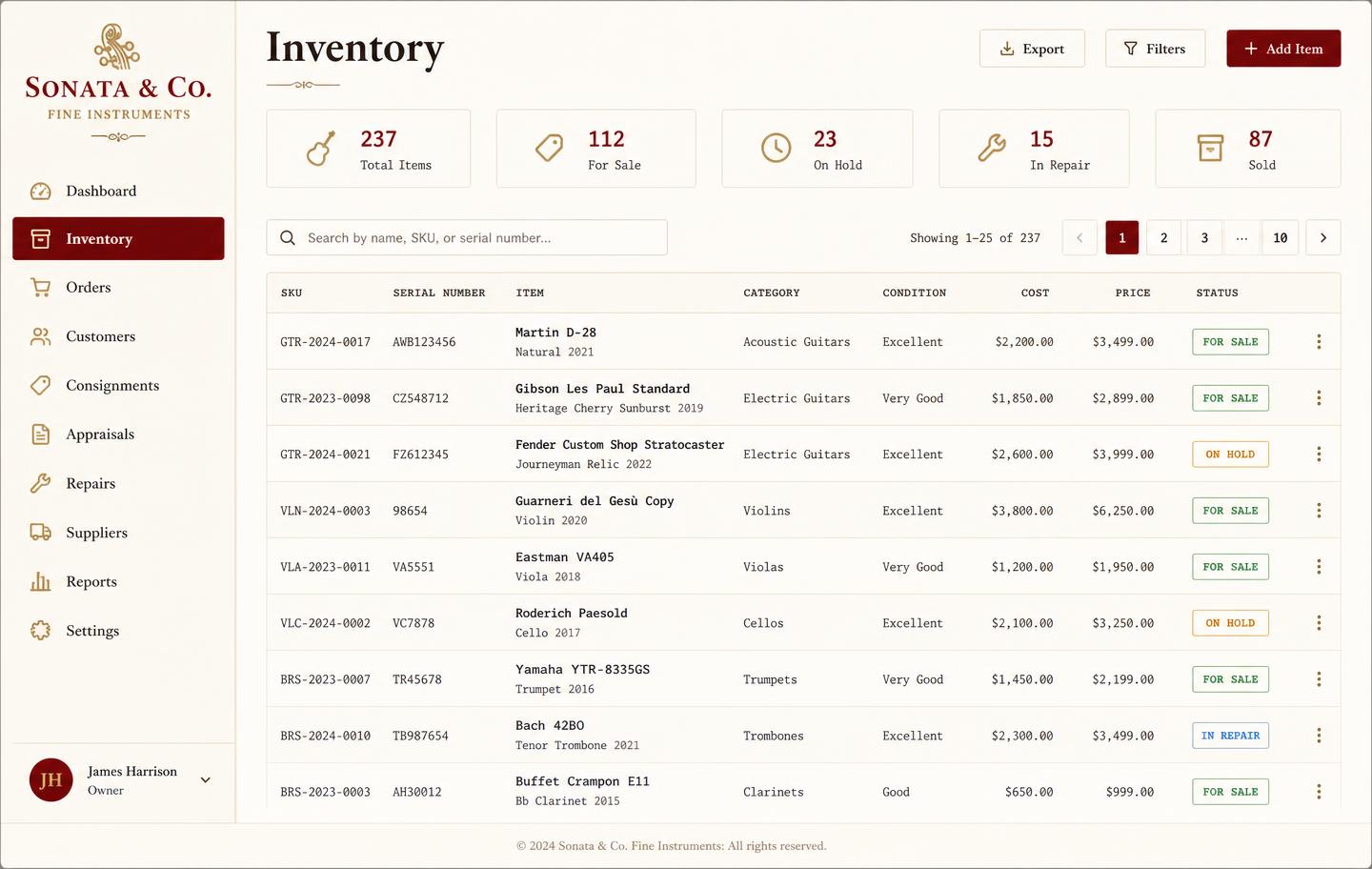
Music shop inventory dashboard listing instruments with SKU, serial number, condition, cost, price and status
InventoryEvery instrument tracked by SKU and serial with condition, cost, retail price, and live status — for sale, on hold, in repair, or sold.
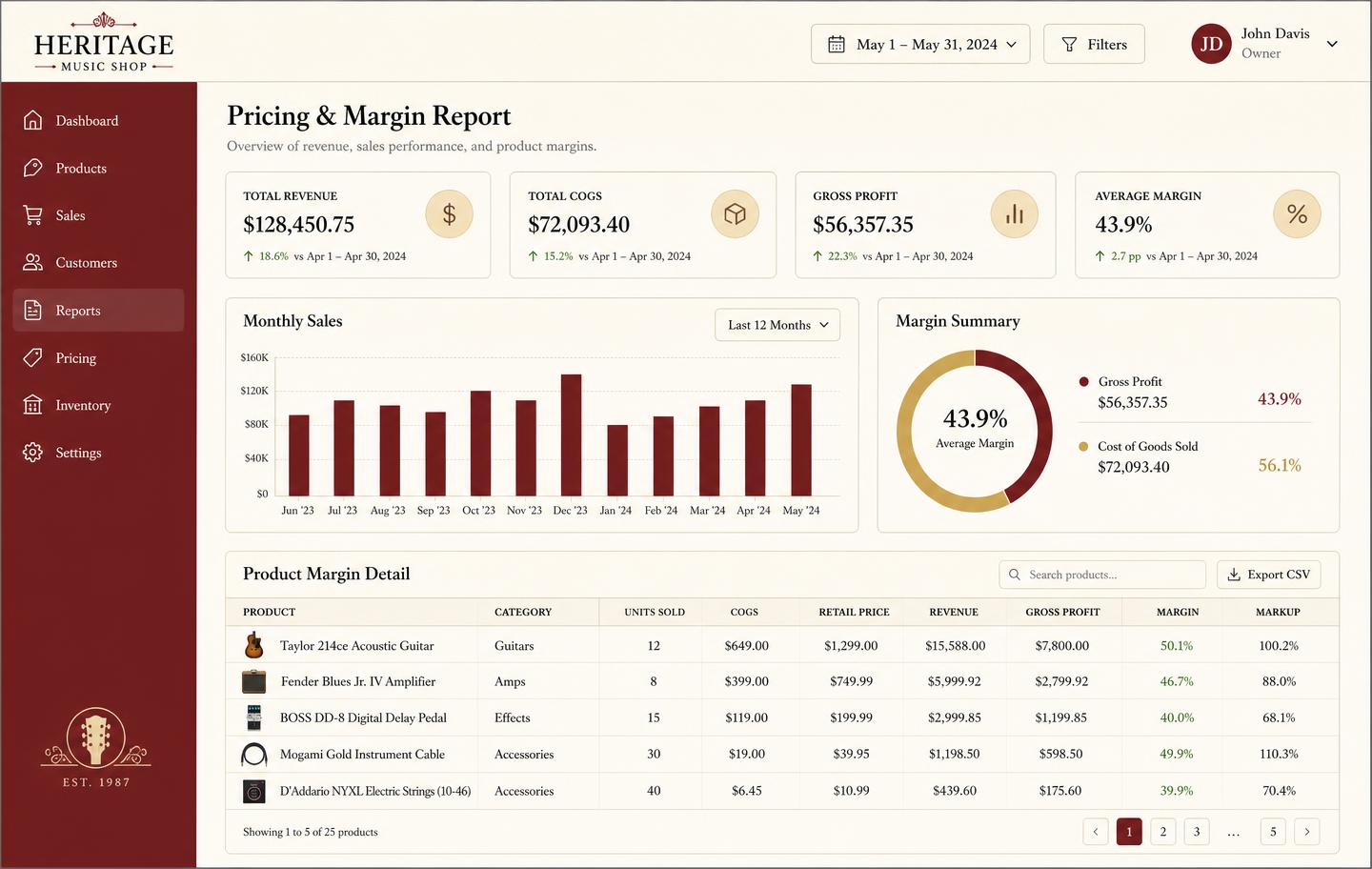
Pricing and margin report showing revenue, cost of goods, gross profit and per-product markup
Pricing & marginRevenue, cost of goods, gross profit, and markup per product so you price from real numbers instead of gut feel.

Honest note

What this is not

Music Shop Suite is a back-office operating system, not a full POS terminal and not a parent-facing autopay portal. If your only requirement is automatic tuition collection through a student app, a dedicated lesson-billing tool is more mature today. If your school also owns, rents and repairs instruments, this replaces three tools with one.

Frequently asked

What is music school management software?
It is the system a music school uses to run enrollment, lesson scheduling, tuition invoicing, teacher pay, and the instruments the school owns or rents out. Music Shop Suite covers all of that in one workspace instead of a scheduling app plus two spreadsheets.
Does it handle multiple teachers and rooms?
Yes. Each teacher has their own calendar, and rooms are tracked as a separate constraint so two lessons cannot be booked into the same studio at the same time.
Can it track the instruments our school owns?
Yes. Every school-owned instrument is a serialized record with condition, current student, and repair history — so you always know which clarinet is out with which family.
How much does music school management software cost?
$49/month flat for the whole school. No per-student pricing, no per-teacher seats, no add-on modules, and no free trial.
Can we migrate from another lesson platform?
Yes. Export your students, teachers, and lesson history to CSV and import them with column mapping. Our switch-from-My-Music-Staff guide walks through it step by step.
Does it work for a school that only teaches?
It does, but be honest about the fit. A teaching-only school with no instrument fleet will use roughly half the system. The value compounds when the school also owns, rents, or repairs instruments.
Can we run group classes and ensembles?
Yes. Group classes and ensembles are scheduled alongside private lessons, with a roster per session rather than a single student.

Sign up today

Run your shop on one workbench — starting today.

$49/month, no contracts, no trial. Import your spreadsheet, invite your team, and have inventory, repairs, rentals, and lessons in one place tonight.