Lesson scheduling software

Lesson Scheduling Software Where the Calendar and the Invoice Agree

Lesson scheduling software is easy to demo and hard to live with, because the timetable is not the hard part — the exceptions are. Cancellations, make-ups, room clashes, term breaks, the family that insists they already paid. Music Shop Suite schedules recurring lessons by teacher and room, marks attendance in the room, and generates the invoice from what actually happened — so the calendar and the bill never disagree.

  • Recurring weekly slots per student, teacher, and room
  • Room and teacher clash detection on every booking
  • Attendance marked in the room: attended, late, absent, cancelled
  • Make-up slots and credits applied to the next invoice
  • Invoices generated from attendance, not retyped from a register
  • Unlimited teachers, students and rooms — flat $49/month

Build the term once

Set the recurring pattern per student, mark the holiday weeks, and the term schedule exists. One-off changes — a swap, a sick day, a room change — never require rebuilding the rest.

  • Term generation with breaks and holidays
  • Per-room and per-teacher calendar views
  • Reschedule a lesson without losing its billing link

Rooms are a constraint, not a note

Most scheduling tools treat the room as a text field. With four studios and nine teachers, the room is the binding constraint — so a clash is refused when you save the booking, not at 4pm on a Tuesday when both students arrive.

  • Room assignment required on every booking
  • Teacher and room conflicts blocked at save
  • Group classes and ensembles alongside private lessons

Cancellations are a policy, not an argument

Notice period, credit, or charge — apply your policy at the moment of the cancellation and everyone sees the same outcome on the balance. No end-of-term reconstruction, no disputed invoices.

  • Attended, late, absent, cancelled and make-up states
  • Credits carried to the next invoice automatically
  • Per-student and per-family balances always current

One bill per family

Tuition, instrument hire and repair charges roll into a single monthly invoice per household, generated from the attendance marks — instead of three separate conversations with the same parent.

See the health of the studio

Attendance rates, revenue per teacher and room utilisation tell you where to add capacity, which enrolments are at risk, and whether the Saturday group class earns its room.

Lesson scheduling options, compared

Studios usually run the timetable on one of three setups. Here is where each holds and where it gives way.

Lesson scheduling options, compared
What the week needsGoogle Calendar + sheetsGeneric booking appMusic Shop Suite
Recurring weekly lessonsManual per weekRecurring eventsTerm generated once
Term breaks and holidaysDelete by handRarelyBuilt into term setup
Room clash detectionNoneSometimesRefused at save
Attendance registerSeparate sheetCheck-in onlyOn the booking itself
Make-up creditsMemoryNoApplied to the invoice
Cancellation policyArgued per caseNoApplied at cancellation
Invoice from attendanceRebuilt monthlyNoGenerated
Rentals and repairs on the billSeparate systemNoSame invoice

Why the timetable is the easy part

Every scheduling tool can draw a grid of weekly slots, which is why demos are uninformative. The grid is never the problem. The problem is that a real teaching week is mostly exceptions: the Tuesday student who moved to Thursday, the lesson cancelled at twenty minutes' notice, the make-up promised in March that nobody recorded, the term break someone forgot to delete from the calendar.

Generic calendars and booking apps store events, so every exception is handled outside the system — in a notebook, a spreadsheet, or your head. That works at ten students and collapses at forty, because exception-handling work grows faster than the roster does.

Lesson scheduling software earns its place by carrying the concepts a calendar lacks: what a student is, what a term is, what a cancellation policy is, and what happens to the money when a lesson does not happen. Once those exist in the system, an exception is recorded at the moment it occurs rather than reconstructed at the end of the month.
The case for tying the calendar to the invoice

Studios bill tuition in one of two ways: a flat monthly or termly fee, or a fee that reflects lessons actually delivered. The flat fee is simple and increasingly unpopular with families. The delivered-lessons model is fairer and creates a large amount of administrative work — unless attendance and invoicing are the same system.

The work comes from translation. A teacher's register has to become an invoice line, usually via a spreadsheet, usually by one person, usually in the last week of the month. Every step is a chance for a lesson to be counted twice, missed entirely, or charged after it was credited as a make-up.

When the invoice is generated from the attendance marks themselves, the translation disappears. The administrator's job changes from reconstructing what happened to reviewing a number that was already correct. For most studios this is the single largest time saving from consolidating scheduling and billing, and it scales with the size of the roster.

What to look for when choosing lesson scheduling software

Start with the constraint that actually binds you. For a solo teacher it is time; for a multi-teacher studio it is rooms; for a school it is usually the instruments that leave the building along with the students. Choose the tool whose data model matches your constraint, not the one with the longest feature list.

Check three things in any trial or demo. First, recurring slots with term breaks: can you generate a whole term in one step and edit a single occurrence without breaking the series? Second, clash detection: does the system refuse a double-booked room, or merely warn? Third, the billing path: can attendance become an invoice without being retyped?

On pricing, prefer flat over per-student. Per-student pricing grows exactly when the intake grows — the moment administration is heaviest and cash is tightest — and it quietly encourages studios to keep records outside the system to stay under a tier. Music Shop Suite is $49/month flat: unlimited teachers, students and rooms, every module included, no contract.

See the workbench before you sign up

Inventory, pricing, lesson bookings, and instrument lending all live in the same back-office dashboard — no separate apps, no re-keying between them.

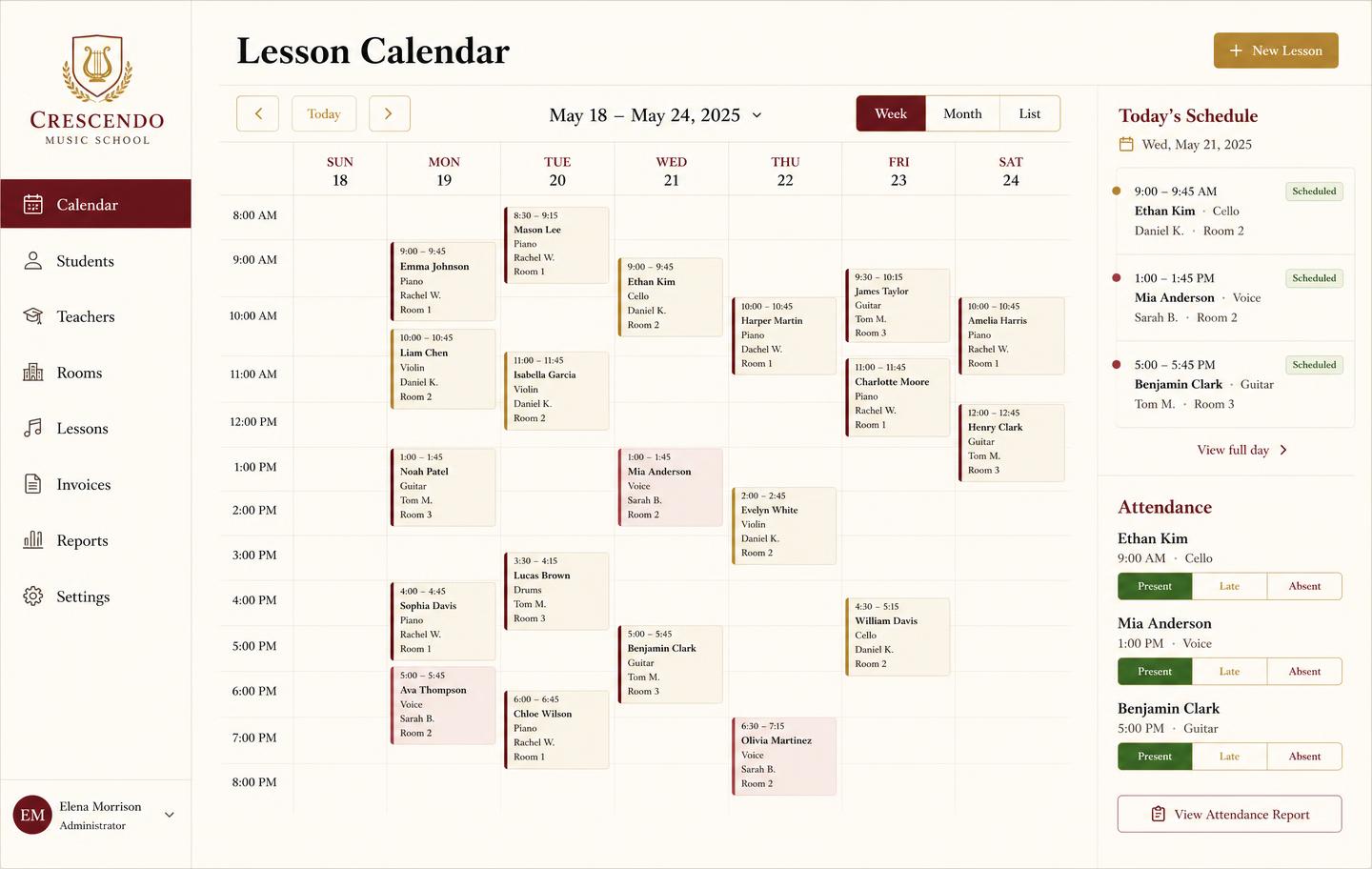
Weekly lesson booking calendar with student lessons, teachers, rooms and attendance
Lesson bookingsA weekly teaching calendar with rooms, teachers, and attendance marking — plus the invoice that follows each lesson block.
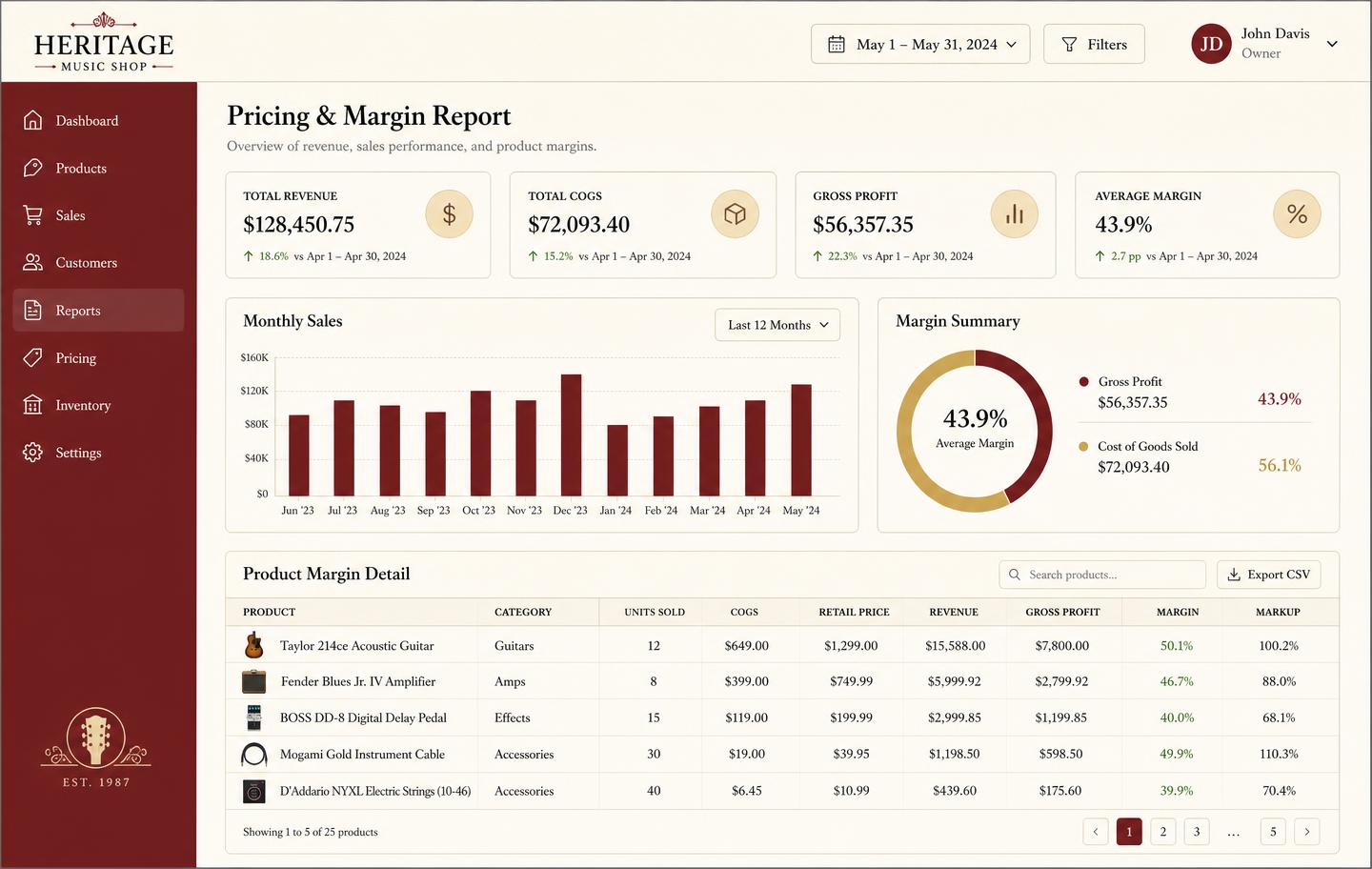
Pricing and margin report showing revenue, cost of goods, gross profit and per-product markup
Pricing & marginRevenue, cost of goods, gross profit, and markup per product so you price from real numbers instead of gut feel.

Honest note

What this is not

Music Shop Suite is a back-office operating system, not a parent-facing booking marketplace or an autopay portal. Families do not book themselves in through an app, and if self-service online booking is your primary requirement, a dedicated booking platform is more mature today. If you also need the invoice, the instruments and the repair bench in the same system as the calendar, this replaces three tools with one.

Frequently asked

What is lesson scheduling software?
It is the system a studio, school or independent teacher uses to run the timetable: recurring weekly slots, teacher and room calendars, attendance, cancellations and make-up credits. Good lesson scheduling software also connects the calendar to billing, so invoices reflect what actually happened in the room.
Does it handle recurring weekly lessons?
Yes. Set a recurring slot per student against a teacher and room, mark the term breaks, and the whole term is generated for you. Changing one lesson never requires rebuilding the rest.
Can several teachers use it at once?
Yes, and there is no per-teacher charge. The plan is $49/month flat for the whole shop, studio or school, with unlimited teachers, students and rooms.
Does it prevent double-booked rooms?
Yes. Rooms are a first-class constraint: if two lessons would land in the same studio at the same time, the second booking is refused at save rather than discovered when both students arrive.
Does scheduling connect to billing?
Yes. Attendance marked on the calendar feeds the family's invoice, alongside any instrument rentals or repairs they have with you — one bill per household instead of three separate conversations.
How does it compare to a generic calendar or booking app?
A generic calendar stores events; it does not know what a student, a term, a make-up credit or a cancellation policy is. Lesson scheduling software carries those concepts natively, which is what makes attendance-to-invoice possible.
How much does lesson scheduling software cost?
Music Shop Suite is $49/month flat — unlimited teachers, students and rooms, every module included. No per-student pricing, no seat licences, no free trial and no contract.

Sign up today

Run your shop on one workbench — starting today.

$49/month, no contracts, no trial. Import your spreadsheet, invite your team, and have inventory, repairs, rentals, and lessons in one place tonight.