Music lesson scheduling software

Music Lesson Scheduling Software for Studios, Schools and Shops

Most scheduling tools stop at the appointment. A teaching business has to survive a full term of reschedules, sick weeks, make-up credits, room clashes, and a parent who is certain they already paid. Music Shop Suite keeps the schedule, the attendance register, and the invoice as one record — so the month-end number is a fact rather than a reconstruction.

  • Recurring weekly slots per student, teacher and room
  • Attendance marked in one tap — present, late, absent, credited
  • Make-up credits tracked until they are genuinely used
  • Invoices built from the lessons that actually took place
  • Lesson revenue reported beside sales, rentals and repairs
  • $49/month flat with unlimited teachers and students

A term, not a day

Set a student's weekly slot once and it runs to the end of term. Holidays, studio closures and teacher absence are applied across the whole calendar rather than deleted lesson by lesson.

  • Recurring bookings with term start and end dates
  • Closure days applied to every teacher at once
  • Single-instance moves that leave the series intact

Rooms are a first-class problem

Most lesson software schedules teachers and ignores rooms. If you have four studios and nine instructors, the room is the constraint that actually breaks — so bookings are validated against it before they save.

  • Room assignment on every booking
  • Conflicts blocked at save time
  • Group classes and ensembles alongside private lessons

Attendance that feeds the invoice

Marking a lesson present, absent or credited is the same action that decides what appears on the month's invoice. There is no register to transcribe and no reconciliation step at billing time.

  • Present, late, absent, cancelled, credited
  • Practice notes per lesson
  • Monthly attendance summary per student

Make-ups without arguments

Your notice policy is applied the same way every time: a late cancellation forfeits, an early one credits. Outstanding credits sit on the student record where both sides can see them.

The student is the customer

The child taking a Tuesday guitar lesson is often the same family renting a violin and buying strings. One record holds the lessons, the rental, the balance and the purchase history.

  • Rented instrument visible on the student card
  • Family grouping for siblings
  • Repair tickets linked to the same household

Every teacher, one price

Per-seat pricing punishes you for growing. This is $49 a month whether you teach alone or run twelve instructors across three rooms.

Shared calendar, lesson app, or Music Shop Suite

Three ways music teaching gets scheduled, and what each one can actually tell you at the end of the month.

Shared calendar, lesson app, or Music Shop Suite
CapabilityShared calendarGeneric booking appMusic Shop Suite
Recurring weekly slotsYesYesYes
Per-room conflict blockingNoRarelyYes
Attendance registerNoSometimesYes
Make-up credit trackingNoNoYes
Invoice from attendanceNoPartialYes
Student is also the shop customerNoNoYes
Rented instrument on the student cardNoNoYes
Lesson revenue in a shop-wide P&LNoNoYes

The dividing line is not the calendar — every option schedules a lesson. It is whether the schedule can answer a billing question without a second spreadsheet.

Why lesson scheduling is a billing problem in disguise

Ask a studio owner what their hardest admin job is and almost nobody says 'putting lessons in a calendar'. Putting lessons in a calendar is easy. The hard part arrives three weeks later, when a parent queries an invoice and the only evidence of what happened is a teacher's memory and a row of coloured blocks in a calendar app that has since been edited.

The reason is structural. A calendar stores an intention — a lesson is supposed to happen at 4pm on Tuesday. An invoice needs a fact — the lesson did or did not happen, and if it did not, whose fault it was under your notice policy. When those two live in separate tools, somebody has to translate between them every month, and that translation is where the money leaks.

Scheduling software built for teaching closes that gap by making attendance a property of the booking itself. The teacher marks the lesson at the end of it, and the billing consequence is already decided. Nothing is transcribed, so nothing is transcribed wrong.
What a make-up credit really costs when it is untracked

Most studios offer some form of make-up: cancel with 24 hours' notice and you get the lesson back. It is a reasonable policy and it is almost always tracked badly, usually in a note field or a teacher's head.

The cost is asymmetric. A credit the studio forgets is a lesson the family never claims — quiet, invisible, and eventually a complaint. A credit the family forgets is a lesson the studio delivers for free. Over a year with forty students, either direction is worth real money, and neither shows up in any report because the credit was never a record in the first place.

Treating a credit as a first-class object — created by a cancellation, consumed by a reschedule, visible to both sides until it is used — turns a recurring argument into a line item. It also makes your policy enforceable, because it is applied by the system rather than negotiated by whichever member of staff answers the phone.

When a shared calendar stops being enough

There is a genuine threshold here, and it is worth being honest about where it sits. One teacher with a handful of students, billing a flat monthly rate, does not need software. A shared calendar and a bank transfer is a perfectly good system, and replacing it would be process for its own sake.

The threshold is crossed on one of three events: a second teacher joins, rooms become scarce, or billing moves from a flat monthly fee to something that depends on attendance. Any one of those turns the calendar from a record into a guess, because a calendar cannot express 'this lesson happened but was not charged' or 'this room is double-booked at 5pm on Thursday'.

If you are near that threshold, the useful comparison is not features but failure modes. Read the fuller breakdown in our comparison of lesson scheduling against Google Calendar, which walks through exactly what breaks and in what order.

Scheduling inside a shop, not beside it

A large share of music teaching happens inside a business that also sells and rents instruments. The same family that books Tuesday lessons rents the clarinet, buys the reeds, and brings it back in March with a stuck pad.

When lessons live in a separate application, that family exists three times: as a student in the lesson app, as a renter in a spreadsheet, and as a customer on a receipt. Nobody can answer a simple question like what this household is worth to the shop each year, and the front desk has to check three places before answering the phone.

Keeping the teaching calendar in the same system as inventory, rentals and repairs collapses those three records into one. It is also why lesson revenue can appear in a shop-wide profit-and-loss report next to retail margin and repair labour — because it was never a separate ledger to begin with.

See the workbench before you sign up

Inventory, pricing, lesson bookings, and instrument lending all live in the same back-office dashboard — no separate apps, no re-keying between them.

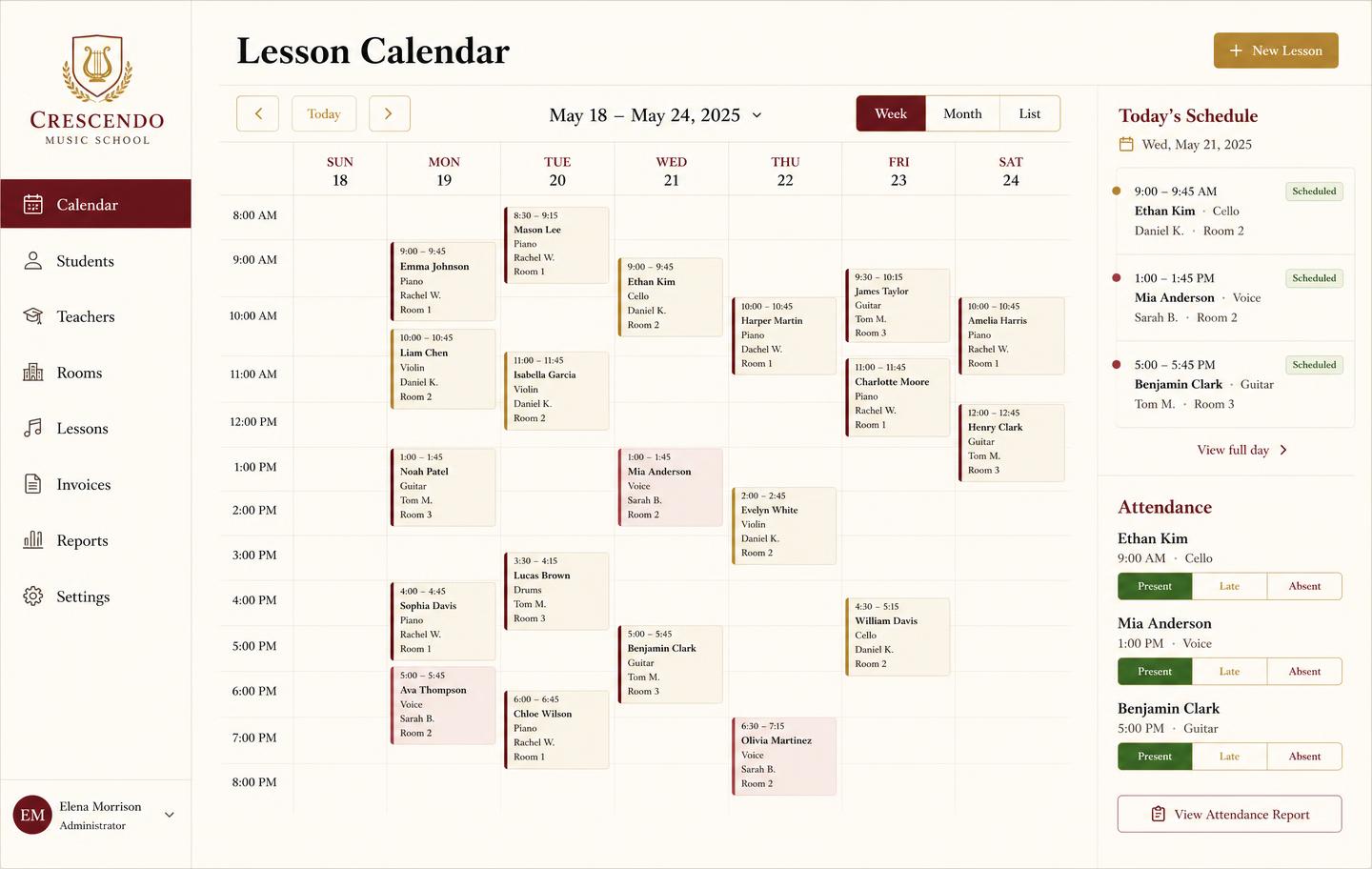
Weekly lesson booking calendar with student lessons, teachers, rooms and attendance
Lesson bookingsA weekly teaching calendar with rooms, teachers, and attendance marking — plus the invoice that follows each lesson block.
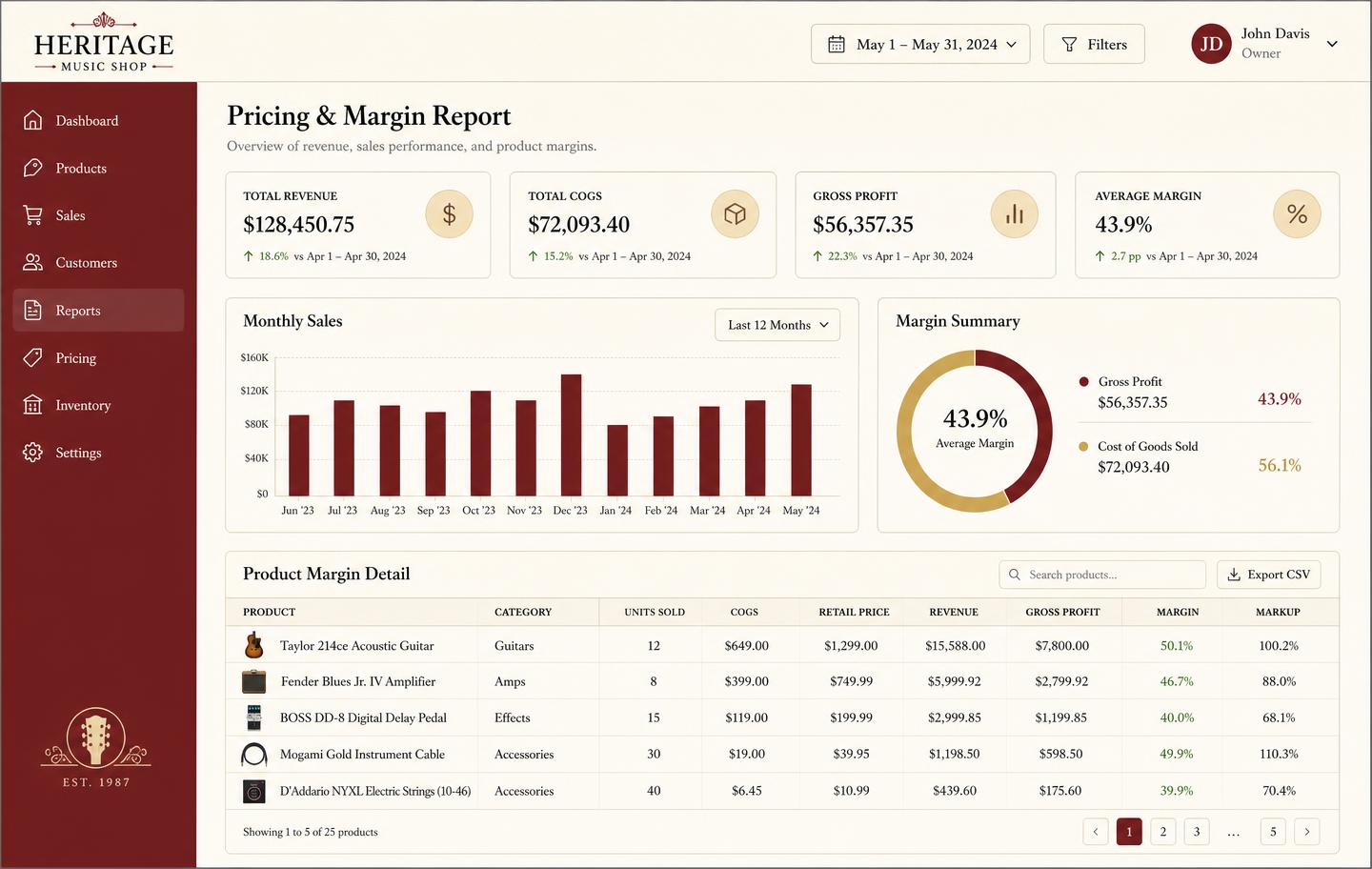
Pricing and margin report showing revenue, cost of goods, gross profit and per-product markup
Pricing & marginRevenue, cost of goods, gross profit, and markup per product so you price from real numbers instead of gut feel.
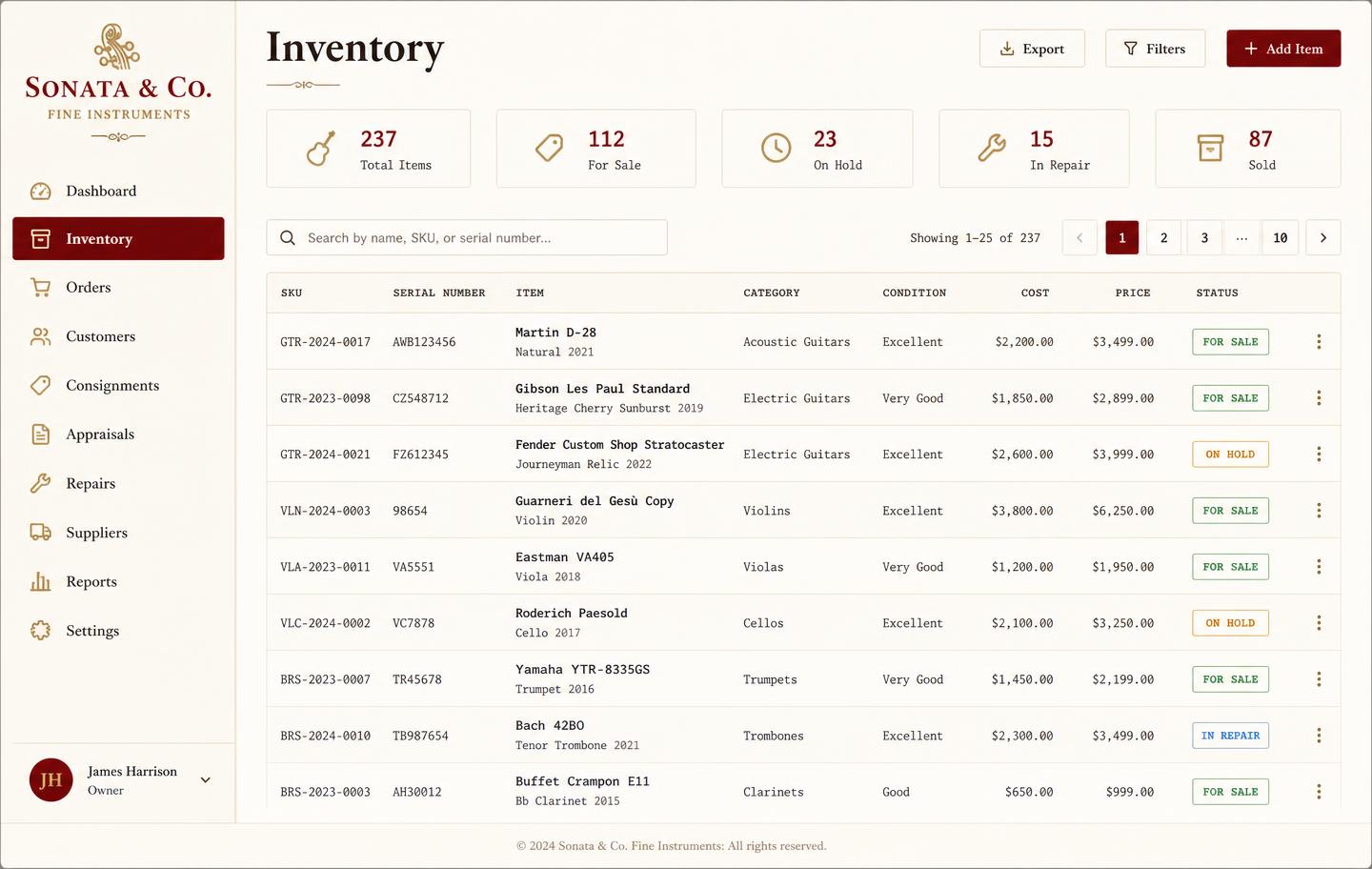
Music shop inventory dashboard listing instruments with SKU, serial number, condition, cost, price and status
InventoryEvery instrument tracked by SKU and serial with condition, cost, retail price, and live status — for sale, on hold, in repair, or sold.
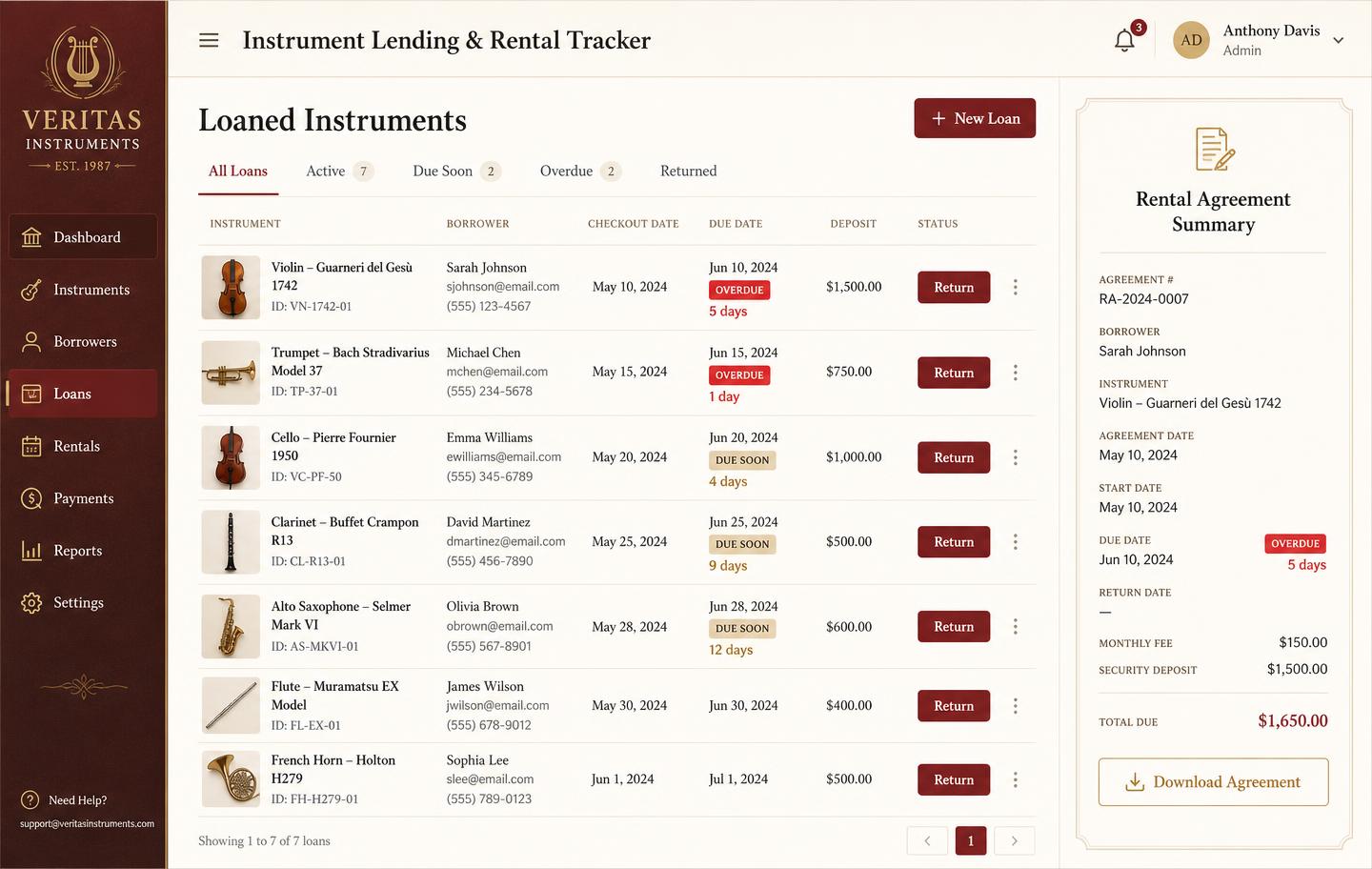
Instrument lending and rental tracker with borrowers, due dates, overdue badges and deposits
Instrument lendingLoans and rentals by unit: who has it, when it is due, what deposit is held, and which agreements are overdue.

Frequently asked

What is music lesson scheduling software?
It is a calendar built around recurring private lessons rather than one-off appointments. Each booking carries a student, a teacher, a room, a rate, and an attendance mark — so the schedule, the register, and the invoice stay the same object instead of three that have to be reconciled.
Can I set up recurring weekly lessons?
Yes. Create a weekly slot for a student and a teacher and it runs for the whole term. You can edit a single instance — move next Tuesday's 4pm to Thursday — without breaking the recurrence behind it.
Does it handle make-up lessons and cancellations?
Yes. A cancellation is marked credited or forfeited according to your notice policy. Credited lessons stay visible on the student record until they are actually rescheduled, so nothing quietly disappears.
Do lesson payments show up in my accounting reports?
Yes. Lesson revenue is a category in the same profit-and-loss report as retail sales, rentals, and repair labour, so you can see what the teaching side of the business really contributes.
Can several teachers use it at once?
Yes. Each teacher sees their own day; the owner sees every teacher and every room on one grid. Room conflicts are blocked at save time rather than discovered on the day.
How much does music lesson scheduling software cost here?
$49 per month flat for the whole shop or studio, with unlimited teachers and students. There is no per-student pricing and no free trial.
Is it better than using a shared Google Calendar?
For a single teacher with six students, a shared calendar is fine. Once attendance drives billing, or once rooms and multiple teachers are involved, a calendar cannot answer the questions that matter — how many lessons a student actually attended this month, and what they owe for them.

Sign up today

Run your shop on one workbench — starting today.

$49/month, no contracts, no trial. Import your spreadsheet, invite your team, and have inventory, repairs, rentals, and lessons in one place tonight.