Music teacher scheduling software

Music Teacher Scheduling Software That Bills Itself

Most teaching calendars stop at the appointment. Yours has to survive a term of reschedules, sick weeks, make-up credits, and a parent who swears they already paid. Music Shop Suite keeps the schedule, the attendance record, and the invoice as one object instead of three.

  • Recurring weekly slots per student, teacher, and room
  • Attendance marked in one tap — present, late, absent, credited
  • Make-up credits tracked until they are actually used
  • Invoices generated from the lessons that really happened
  • One flat price for every teacher on your roster

A term, not a day

Set a student's weekly slot once and it runs for the whole term. Holidays, studio closures, and teacher absences are applied across the calendar rather than deleted lesson by lesson.

  • Recurring bookings with term start and end dates
  • Studio closure days applied to every teacher at once
  • Room conflicts blocked before they are saved

Attendance that feeds the invoice

Marking a lesson present, absent, or credited is the same action that decides what appears on the month's invoice. There is no second spreadsheet to reconcile at billing time.

  • Present, late, absent, cancelled, credited
  • Notes per lesson for practice assignments
  • Monthly attendance summary per student

Make-ups without arguments

Your cancellation policy is applied consistently: a late cancellation forfeits, an early one credits. Outstanding credits show on the student record so both sides can see what is owed.

Every teacher, one price

Per-teacher pricing punishes you for growing. Music Shop Suite is $49 a month whether you teach alone or run twelve instructors across three rooms.

  • Unlimited teachers and students
  • Per-teacher pay rates and lesson revenue reports
  • Teacher-level views alongside the owner's master grid

Built for teachers inside a shop

If you also sell strings, rent a violin to that same student, or fix a cracked bridge on the way out, the lesson calendar sits beside the inventory, rentals, and repair bench in one system.

  • Student is the same record as the customer
  • Rented instrument visible on the student's card
  • Lesson revenue lands in the same accounting reports

Nothing to install

It runs in the browser on the front desk machine, your laptop, and a phone between lessons. Data lives in your account, exportable at any time.

What teachers usually schedule with, and what it costs them

Every option below puts a lesson on a calendar. They differ in what they can tell you at the end of the month.

What teachers usually schedule with, and what it costs them
CapabilityPaper diaryShared calendarMusic Shop Suite
Recurring weekly slotsYesYesYes
Visible to the whole teamNoYesYes
Room conflicts preventedNoNoYes
Attendance registerSometimesNoYes
Make-up credits trackedNoNoYes
Invoice built from attendanceNoNoYes
Cost of adding a teacherNoneNoneNone — flat $49

The reschedule is the whole problem

A teaching week that goes exactly as planned needs no software. What software is for is the week that does not: a student off sick on Monday, a teacher's car failing on Wednesday, a school concert removing four lessons on Thursday, and a parent asking on Friday why the invoice looks different.

Each of those events has two consequences — one on the calendar and one on the money — and almost every tool handles only the first. The lesson gets moved, the billing implication is remembered by a human, and the accuracy of the month depends on how good that human's memory was under pressure.

Keeping attendance on the booking makes the second consequence automatic. Moving a lesson, crediting it, or marking it forfeited is one action with one outcome, which is why studios that consolidate usually report the month-end shrinking from a day to under an hour.
Why per-teacher pricing shapes bad decisions

When software costs money per instructor, hiring gets an extra hesitation attached to it. It is a small amount, and it should not matter, but owners consistently report weighing it — particularly for a part-time teacher covering a handful of students.

The same logic applies to trial arrangements. A teacher brought in for one term to test demand is harder to justify when they carry a recurring seat cost and an onboarding step, so the test does not happen and the demand goes unmeasured.

Flat pricing removes the calculation entirely. Twelve instructors across three rooms costs what one teacher costs, which means the decision to add someone is made on teaching grounds alone. That is the intent behind our single price rather than a pricing gimmick.

Teaching that sits inside a shop

A large share of private music teaching happens in a business that also sells and rents instruments. The Tuesday guitar student rents the amp, buys the strings, and brings the guitar in when the input jack fails.

Run on separate tools, that household exists three times over and no one can answer what it is worth annually or whether its rental is overdue while its lessons are paid up. The front desk checks three places to answer a simple phone call.

Keeping the teaching calendar in the same system as inventory, rentals and the repair bench collapses those records into one household and one instrument history. It also means lesson revenue appears in the shop's profit-and-loss beside retail margin and repair labour, which is the only way to see what the teaching side really contributes.

See the workbench before you sign up

Inventory, pricing, lesson bookings, and instrument lending all live in the same back-office dashboard — no separate apps, no re-keying between them.

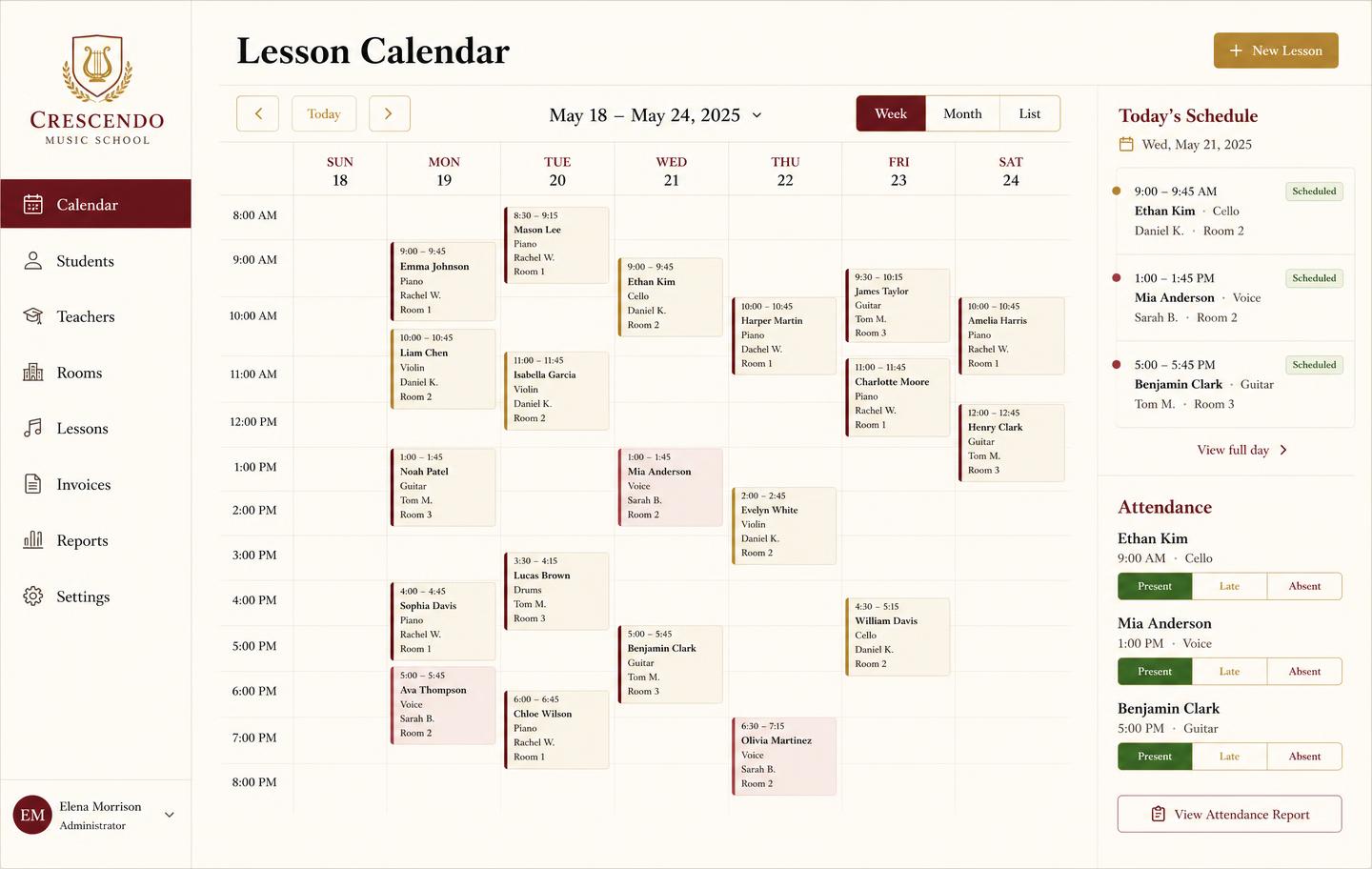
Weekly lesson booking calendar with student lessons, teachers, rooms and attendance
Lesson bookingsA weekly teaching calendar with rooms, teachers, and attendance marking — plus the invoice that follows each lesson block.
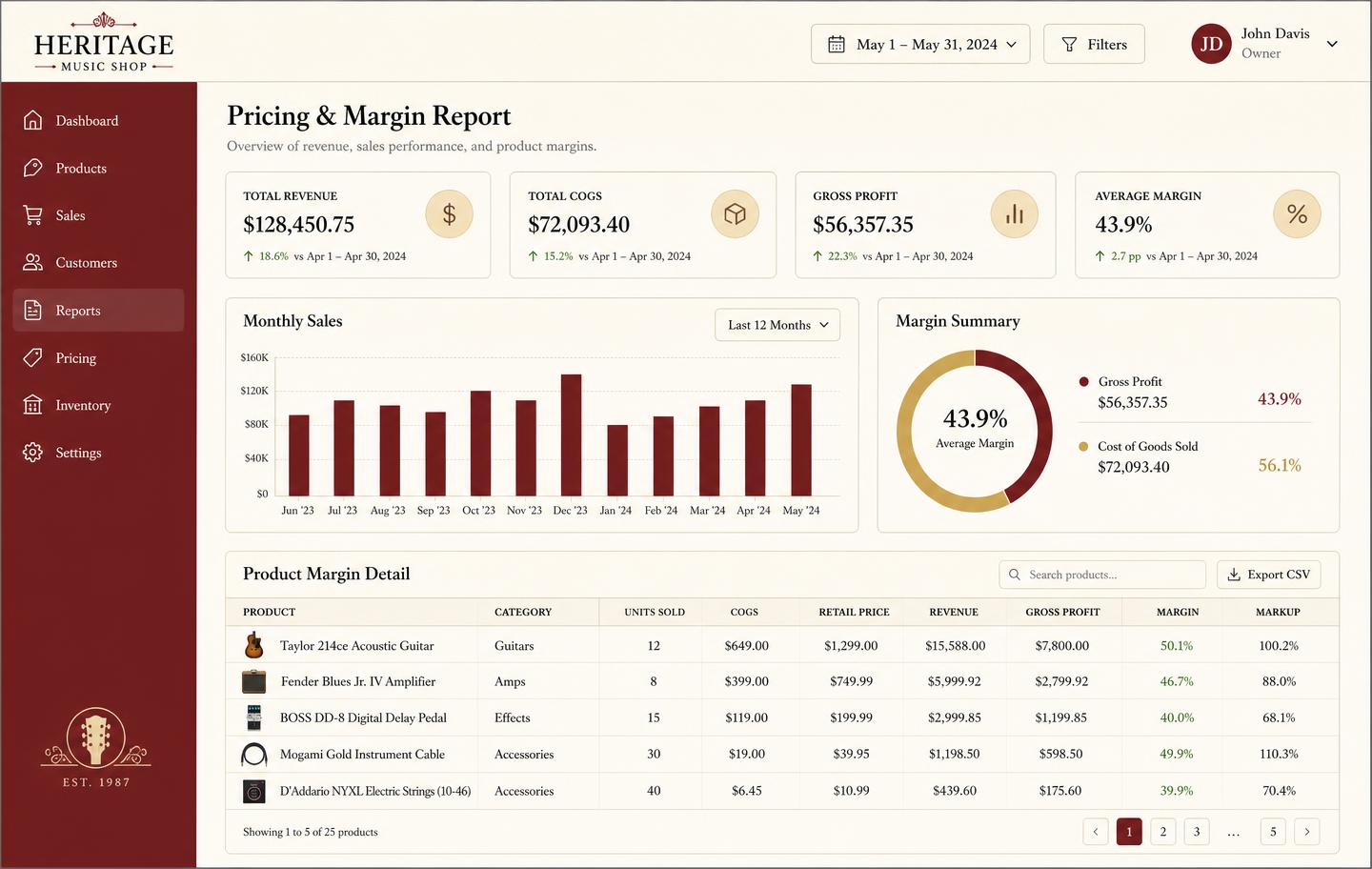
Pricing and margin report showing revenue, cost of goods, gross profit and per-product markup
Pricing & marginRevenue, cost of goods, gross profit, and markup per product so you price from real numbers instead of gut feel.
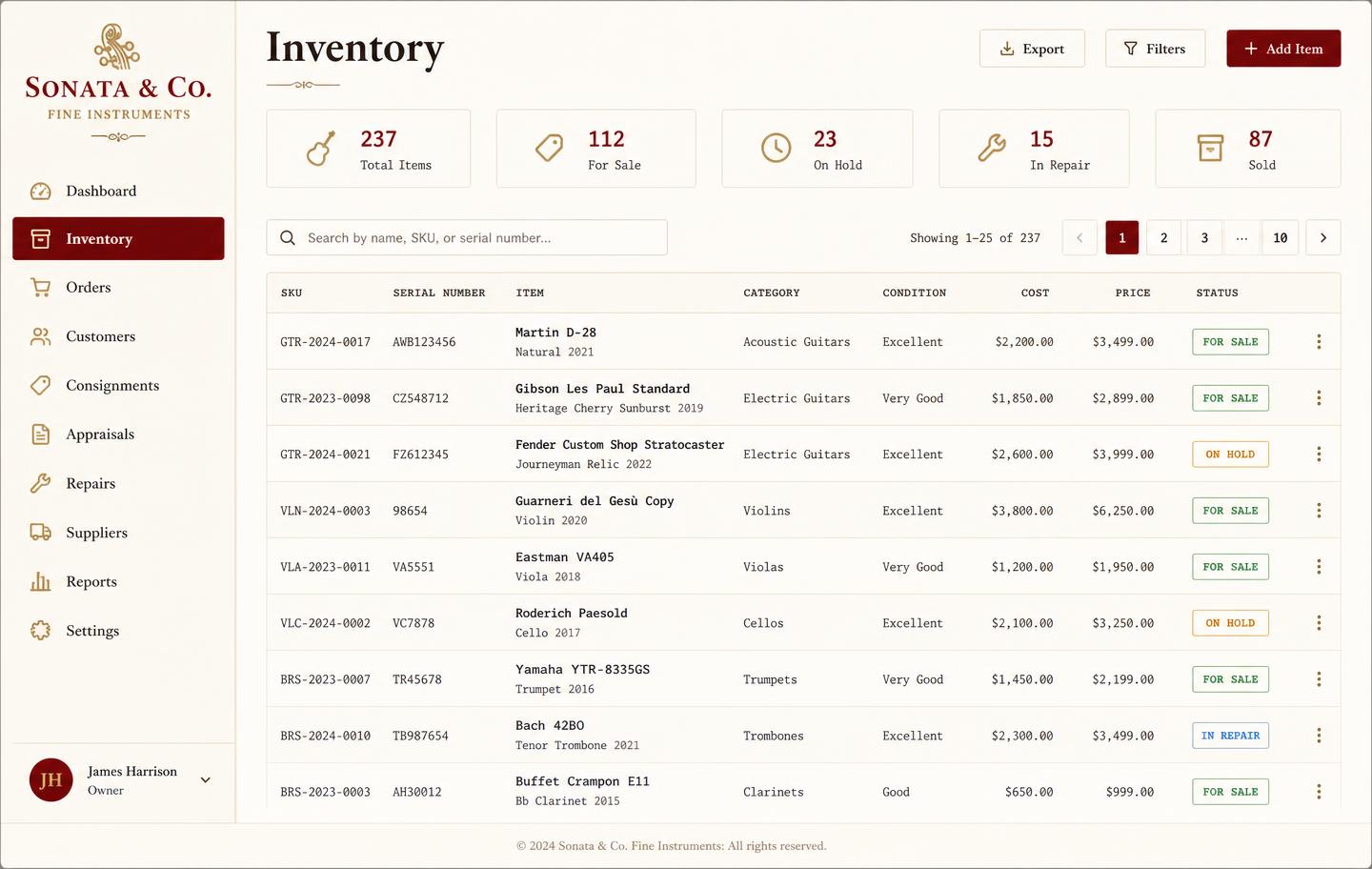
Music shop inventory dashboard listing instruments with SKU, serial number, condition, cost, price and status
InventoryEvery instrument tracked by SKU and serial with condition, cost, retail price, and live status — for sale, on hold, in repair, or sold.
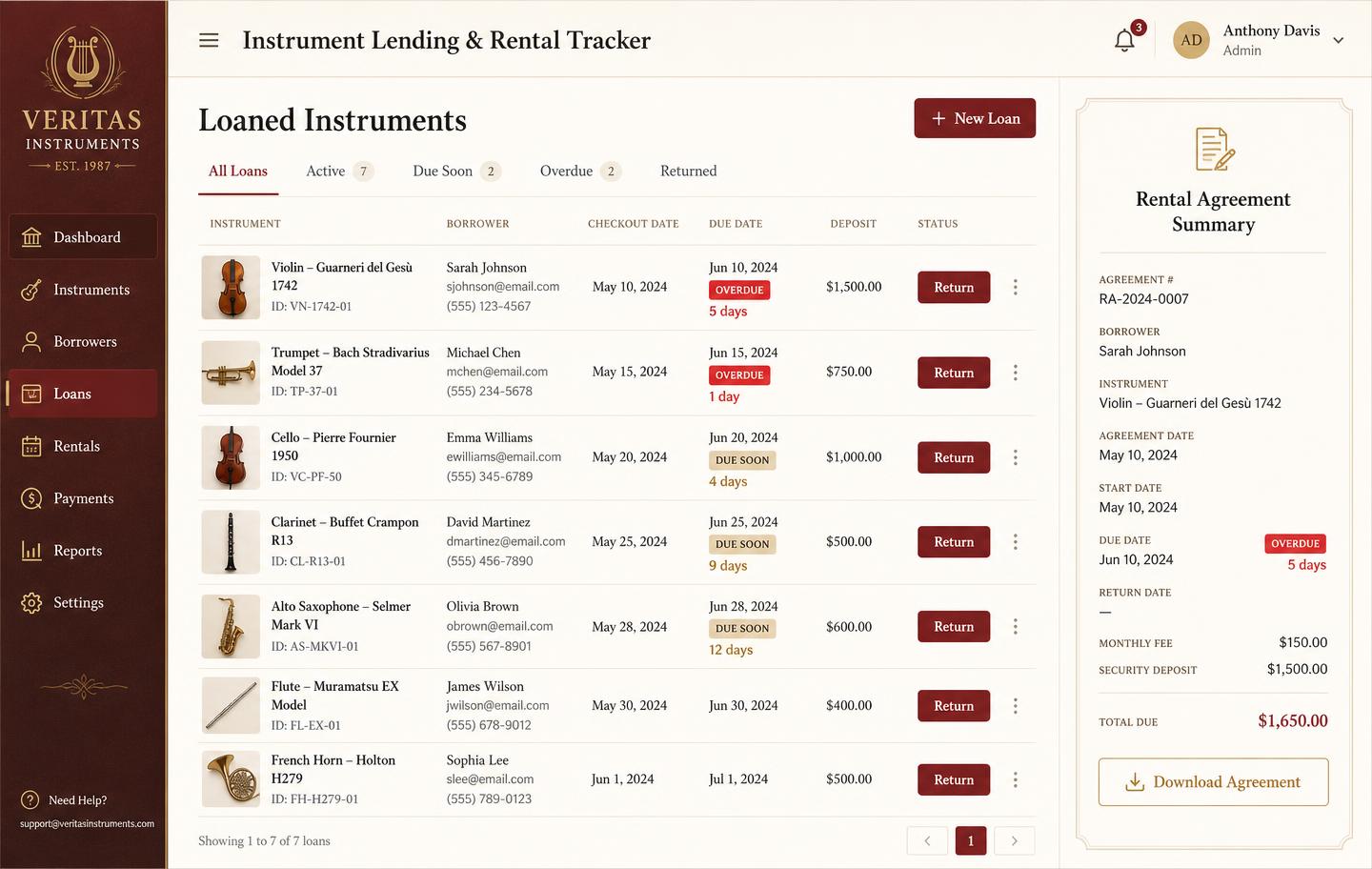
Instrument lending and rental tracker with borrowers, due dates, overdue badges and deposits
Instrument lendingLoans and rentals by unit: who has it, when it is due, what deposit is held, and which agreements are overdue.

Frequently asked

What is music teacher scheduling software?
It is a calendar built around recurring private lessons: each student has a weekly slot, a teacher, a room, a rate, and an attendance record. Reschedules, make-ups, and cancellations move the booking without breaking the billing behind it.
Can several teachers share one schedule?
Yes. Each teacher sees their own day, while the shop or school owner sees every room and every teacher on one grid, so double-booked rooms are impossible to create by accident.
Does it handle make-up lessons?
A cancelled lesson can be marked as credited or forfeited by your own policy. Credited lessons stay visible until they are rescheduled, so nobody loses track of what is owed.
How much does it cost?
$49 a month for the whole shop or studio — scheduling, students, invoicing, inventory, rentals, and repairs included. No per-teacher fee and no free trial.

Sign up today

Run your shop on one workbench — starting today.

$49/month, no contracts, no trial. Import your spreadsheet, invite your team, and have inventory, repairs, rentals, and lessons in one place tonight.