Migration guide

How to Switch From My Music Staff Without Losing a Single Lesson

Switching lesson platforms mid-term feels risky. It does not have to be. Here is the exact order of operations studios use to move students, history, and schedules into Music Shop Suite in an afternoon.

  • Export students, families, and lesson history to CSV first
  • Import and map columns once
  • Rebuild recurring lesson slots by teacher and room
  • Run both systems in parallel for one week
  • Cancel only after your first clean invoice run

Step 1 — Export everything

In My Music Staff, export your student list, family contacts, lesson history, and any outstanding balances. Save the CSVs somewhere permanent. Do this while your account is still active.

  • Students and instruments studied
  • Family contacts and email addresses
  • Lesson history and attendance
  • Outstanding balances per family

Step 2 — Import into Music Shop Suite

Create your shop, then import the student CSV and map columns once. Families group automatically by shared contact, so siblings land under one household.

Step 3 — Rebuild the schedule

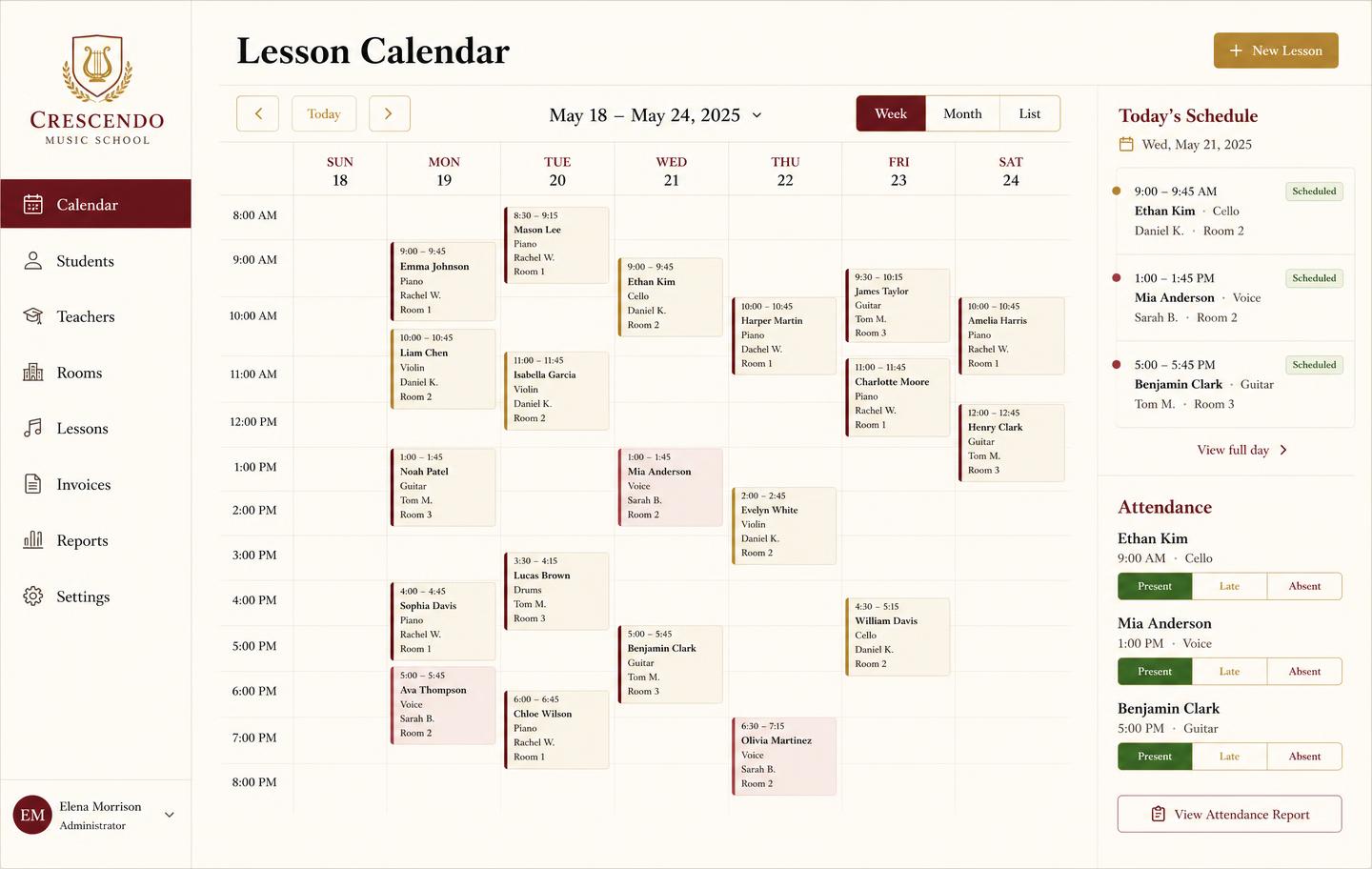
Recurring lessons are the one thing worth rebuilding by hand, because it is your chance to assign rooms. Set each teacher's weekly slots, attach a room, and the calendar blocks conflicts from then on.

Step 4 — Add the things you kept in spreadsheets

This is the payoff. Load your school-owned instruments as serialized records, open rental agreements against the students who have them, and enter any repairs currently on the bench.

  • Serialized instruments with condition notes
  • Open rentals tied to student records
  • Repair tickets with parts and labor

Step 5 — Parallel week, then cut over

Keep the old account read-only for a week while you take attendance and invoice in Music Shop Suite. Once one clean invoice run lands, cancel. Keep the CSV exports in your records regardless.

What moves, what gets rebuilt, what stays behind

Knowing which of these three buckets each item falls into is most of the planning work.

What moves, what gets rebuilt, what stays behind
DataHow it movesEffort
Students and familiesCSV export and import with column mappingMinutes
Outstanding balancesCSV import, verified against old statementsMinutes
Teachers and ratesEntered by handUnder an hour
Recurring lesson slotsRebuilt so rooms can be assigned1–2 hours
Lesson history and attendanceCSV import, or kept as an archive fileMinutes
Instruments and rentalsEntered fresh — no source to export from1–2 hours
Open repair ticketsEntered freshMinutes
Tuition autopay mandatesDoes not transferRe-collect

Sequence matters more than speed

The failure mode in a platform move is almost never lost data. It is billing: a family charged twice, or a family charged by neither system because the cutover landed mid-cycle.

Avoid it by treating the invoice run as the cutover event rather than the import. Import everything, verify balances against the old statements, then let the old system finish its current cycle before you raise a single invoice in the new one.

Run both in parallel for that one cycle. It feels redundant and it is the step that turns a risky migration into an uneventful one.
Rebuild the schedule rather than importing it

Recurring slots are the one thing worth entering by hand. Imported schedules carry forward every stale slot — the student who quit in March, the Tuesday hour that moved twice.

Rebuilding takes an hour or two and gives you a clean term with rooms attached, which is what enables conflict blocking afterwards. Studios that skip this step generally end up doing it anyway within a month.

The part most studios underestimate

Entering the instrument fleet is usually the longest task, because the information does not exist anywhere complete. Serial numbers live on labels, condition lives in someone's memory, and who currently has what lives in a text thread.

Budget an afternoon and treat it as an audit rather than data entry. Most studios find at least one instrument nobody can account for, which is itself the argument for keeping the record properly from then on.

See the workbench before you sign up

Inventory, pricing, lesson bookings, and instrument lending all live in the same back-office dashboard — no separate apps, no re-keying between them.

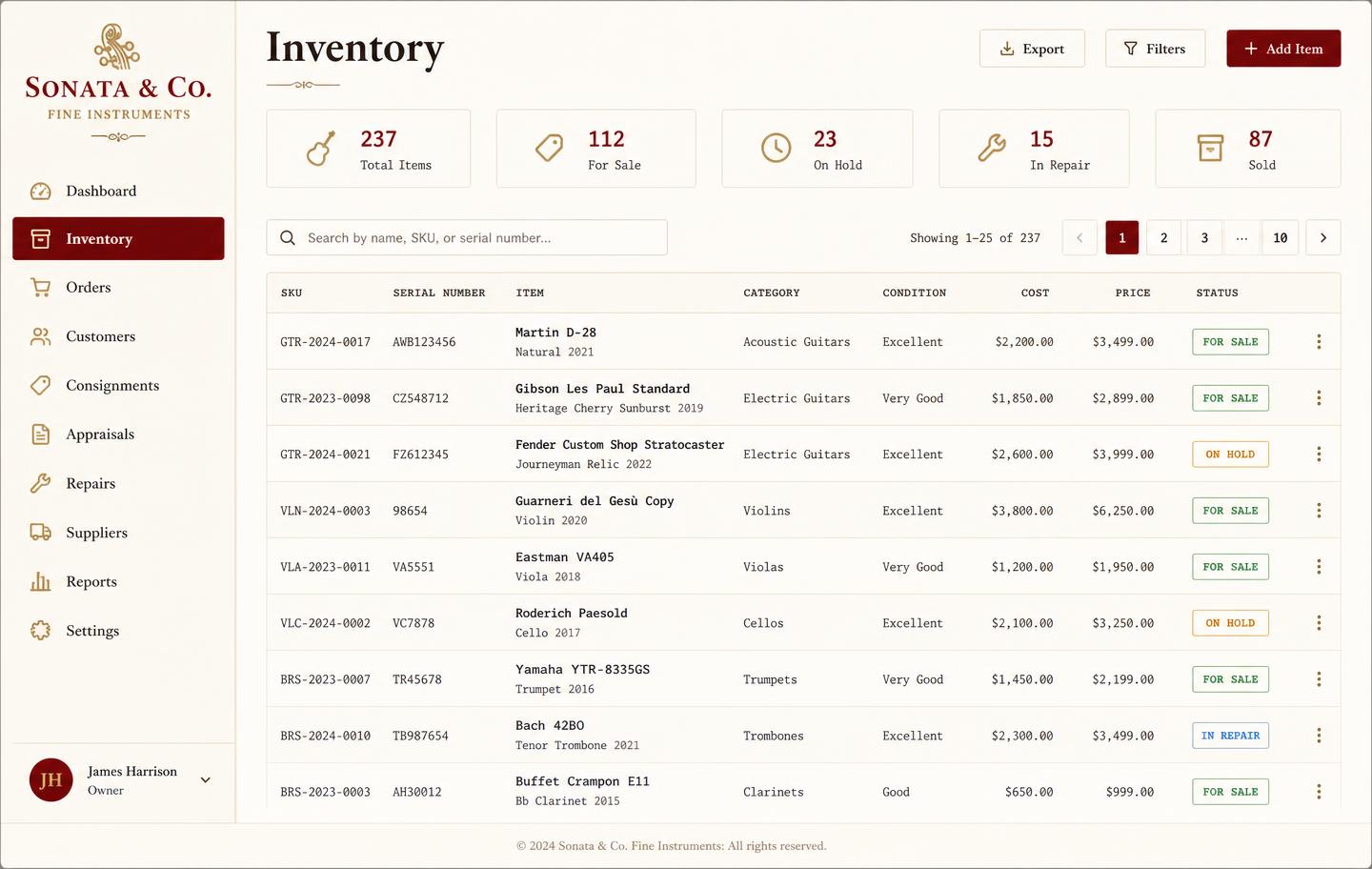
Music shop inventory dashboard listing instruments with SKU, serial number, condition, cost, price and status
InventoryEvery instrument tracked by SKU and serial with condition, cost, retail price, and live status — for sale, on hold, in repair, or sold.
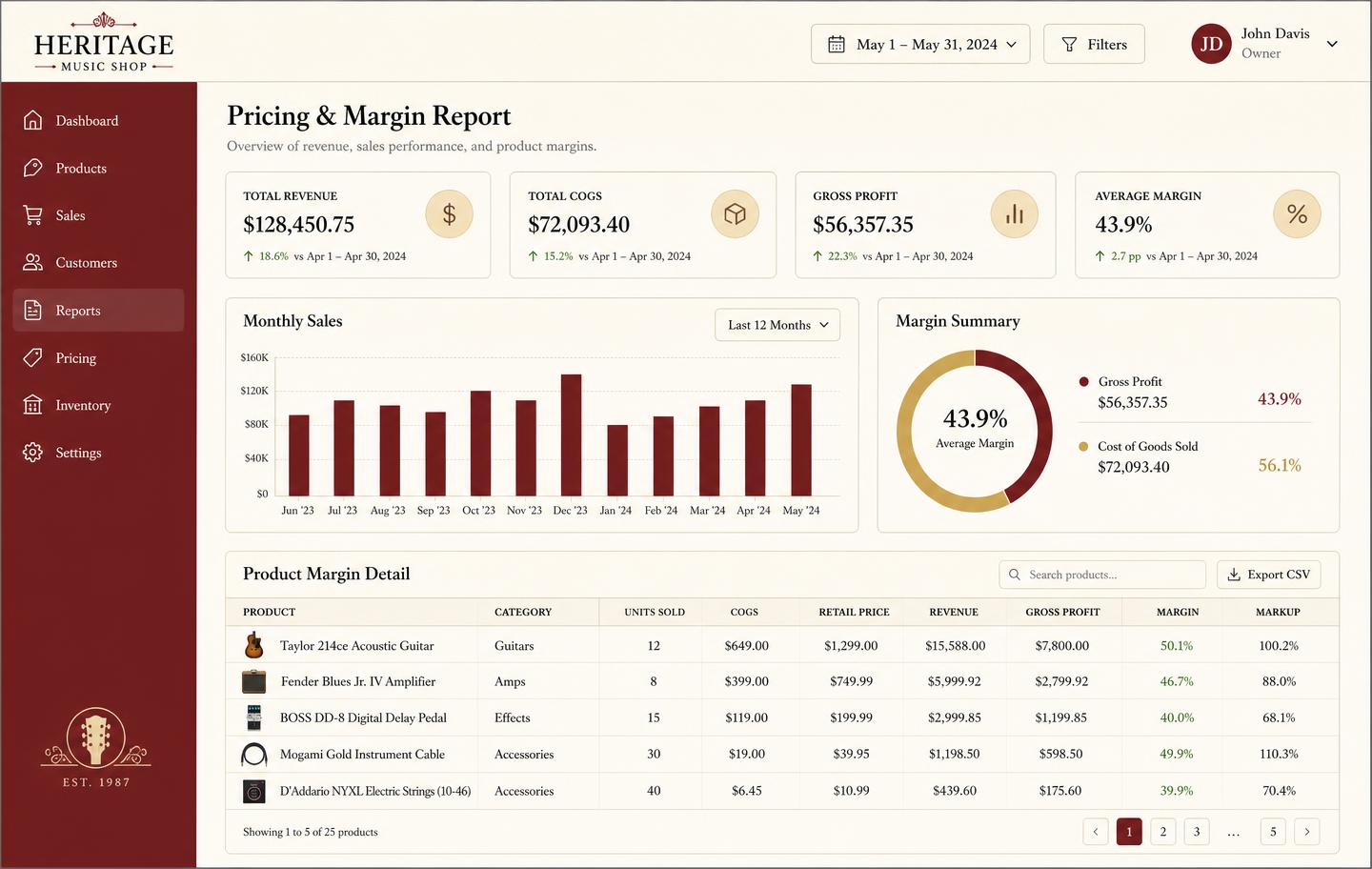
Pricing and margin report showing revenue, cost of goods, gross profit and per-product markup
Pricing & marginRevenue, cost of goods, gross profit, and markup per product so you price from real numbers instead of gut feel.
Weekly lesson booking calendar with student lessons, teachers, rooms and attendance
Lesson bookingsA weekly teaching calendar with rooms, teachers, and attendance marking — plus the invoice that follows each lesson block.
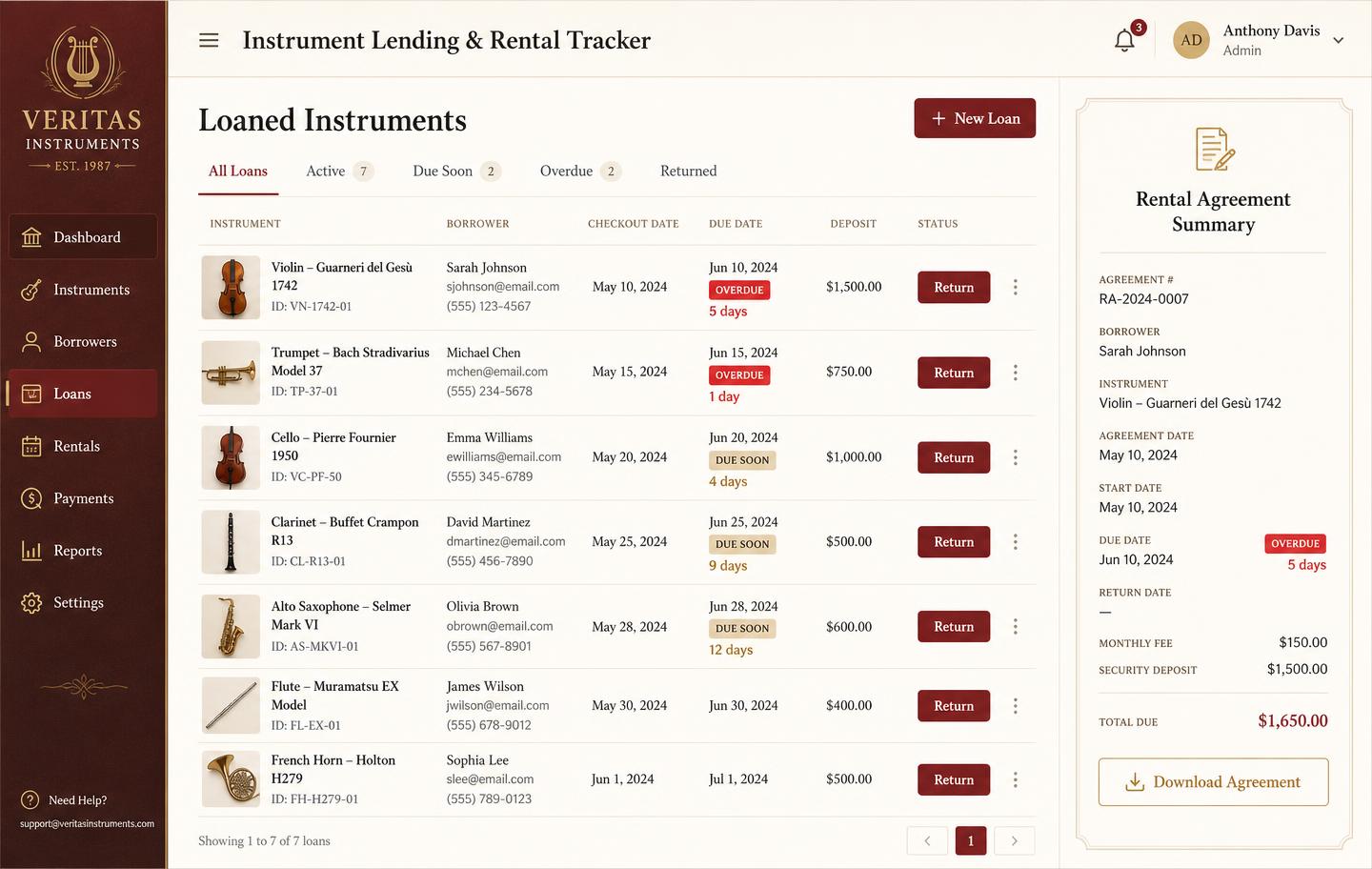
Instrument lending and rental tracker with borrowers, due dates, overdue badges and deposits
Instrument lendingLoans and rentals by unit: who has it, when it is due, what deposit is held, and which agreements are overdue.

Honest note

What you will miss on day one

There is no parent-facing autopay portal yet, so tuition is invoiced from the back office rather than charged automatically through a student app. Studios that depend on hands-off collection should weigh that before moving.

Frequently asked

How do I export my data from My Music Staff?
Use their built-in export to download your students, families, and lesson history as CSV files. Export before you cancel — once an account closes, exports are no longer available.
How long does the switch take?
Most studios finish in an afternoon: export CSVs, import students and teachers, rebuild recurring lesson slots, then run both systems for one week as a safety net.
Will I lose lesson history?
No, if you export it first. Import the history file alongside your student list and past lessons stay attached to each student.
What is the best time of year to switch?
Between terms. A summer or semester break means fewer live recurring bookings to rebuild and no mid-month tuition run to reconcile.
What about tuition payments in flight?
Let any scheduled charges in your old system complete, then stop new ones before your first invoice run in Music Shop Suite so no family is billed twice.

Sign up today

Run your shop on one workbench — starting today.

$49/month, no contracts, no trial. Import your spreadsheet, invite your team, and have inventory, repairs, rentals, and lessons in one place tonight.