Da Capo alternative

A Modern Alternative to Da Capo for Independent Music Shops

Da Capo has run music shop counters for a long time, and shops that only need a till and a stock list are often well served by it. The shops that go looking for an alternative usually want the same three things: access from a browser instead of one machine, rentals and repairs treated as real workflows rather than notes on a product, and pricing that does not scale with terminals. That is the gap Music Shop Suite fills.

  • Browser-based — bench, counter and office see the same data
  • One serialized record per instrument, not a quantity on a SKU
  • Rentals with contracts, deposits, due dates and overdue chasing
  • Repair work orders with parts, labour and technician queues
  • Lesson scheduling with rooms, attendance and invoicing
  • $49/month flat, unlimited users, no support contract

Inventory that knows each instrument apart

The core difference is the unit of record. Retail packages count SKUs; music shops sell individual objects with a serial, a condition, a cost basis and a history. Every unit here is its own card.

  • Serial, condition grade, cost, price and photographs per unit
  • Full history: goods-in, loans, repairs, price changes, sale
  • Live stock valuation and ageing without rebuilding a sheet

Rentals as a workflow, not a note

A hire is a contract with a deposit, a due date and an instrument that must come back in a known condition. Tracking that as a comment on a product record is where most shops' spreadsheets begin.

  • Agreement per unit with renter, dates and deposit
  • Overdue list that updates itself
  • Condition captured at dispatch and at return

The bench in the same system as the stock

Repairs attach to the instrument, so a unit's total cost of ownership is visible instead of being absorbed into workshop overheads.

  • Work orders with parts, labour and approvals
  • Per-technician queues and status the counter can read out
  • Customer-owned and shop-owned jobs side by side

Month-end without the rebuild

Profit and loss across sales, rentals, repairs and lessons, live stock valuation, and period exports your bookkeeper accepts without re-keying.

Da Capo vs Music Shop Suite

A traditional installed music retail package next to a browser-based back office. They overlap less than the category name suggests.

Da Capo vs Music Shop Suite
CapabilityTraditional installed retail packageMusic Shop Suite
Card processing and cash drawerYesNo — pair with a terminal
Access from anywhereUsually one machine or a remote sessionAny browser
Per-unit serialized recordsPartialEvery instrument
Rental contracts and depositsBolt-on or manualBuilt in
Repair work ordersBolt-on or paperBuilt in
Lesson scheduling and attendanceNoBuilt in
Consignment splits and payoutsManualBuilt in
Profit across all four income linesSales onlySales, rentals, repairs, lessons
Pricing modelPer terminal plus support$49/month flat, unlimited users

Feature availability in installed retail packages varies by version and modules purchased; check your own licence before comparing.

What shops actually miss when they leave an installed package

It is worth being fair about what a mature installed retail package does well, because shops that switch on marketing alone tend to switch back. Installed systems are fast, they work when the internet does not, they have deep vendor catalogue support, and they were built by people who understood a counter. None of that is trivial and none of it should be dismissed.

What they were not built for is a shop where a large share of revenue never crosses the counter at all. Rentals bill monthly. Repairs are quoted, approved and collected days later. Lessons recur weekly and are invoiced by term. Those three streams frequently outweigh retail sales in an independent shop, and they are exactly the ones a counter-shaped system models as an afterthought.

So the realistic move is not a replacement but a split. Keep something cheap and reliable at the till. Move the parts of the business that are about objects, obligations and time into a system designed around them. Shops that frame the decision that way are far happier a year later than shops that tried to find one product doing both.
The hidden cost of a system tied to one machine

Installed software concentrates the business into a physical location — usually a computer in the back office that everyone queues for. The costs of that arrangement are real but rarely itemised, because they show up as time rather than invoices.

The technician cannot look up a serial without leaving the bench, so job notes get written on paper and typed up later, or not at all. The owner cannot check stock value from home, so decisions wait until Monday. A second location cannot see the first location's inventory, so transfers happen by phone call and get recorded twice.

There is also a risk profile nobody enjoys thinking about. A single machine holding the shop's entire trading history needs a backup regime that is somebody's job, and in most independents it is nobody's. Browser-based systems remove that class of problem — not because they are fashionable, but because the data stops living somewhere that can be dropped, stolen or flooded.

How to evaluate a switch in a fortnight

Do not start with a feature list. Start by writing down the five questions you most often cannot answer quickly: what is on hire and overdue, what is on the bench and for how long, what the current stock is worth, which consignors are owed, and what the month actually made. Those five questions are the real specification.

Then load a genuine slice of data — thirty instruments, ten customers, whatever is currently out on rental — rather than a demo dataset. A system that handles a clean sample and struggles with your actual serial number conventions will struggle in month three too.

Finally, run the two systems in parallel for two weeks with the bench and the rental log moved first, since those are the areas where an installed retail package gives the least. If the five questions above answer themselves by the end of the fortnight, the switch is already paying for itself at $49/month. If they do not, you have lost two weeks and no money.

See the workbench before you sign up

Inventory, pricing, lesson bookings, and instrument lending all live in the same back-office dashboard — no separate apps, no re-keying between them.

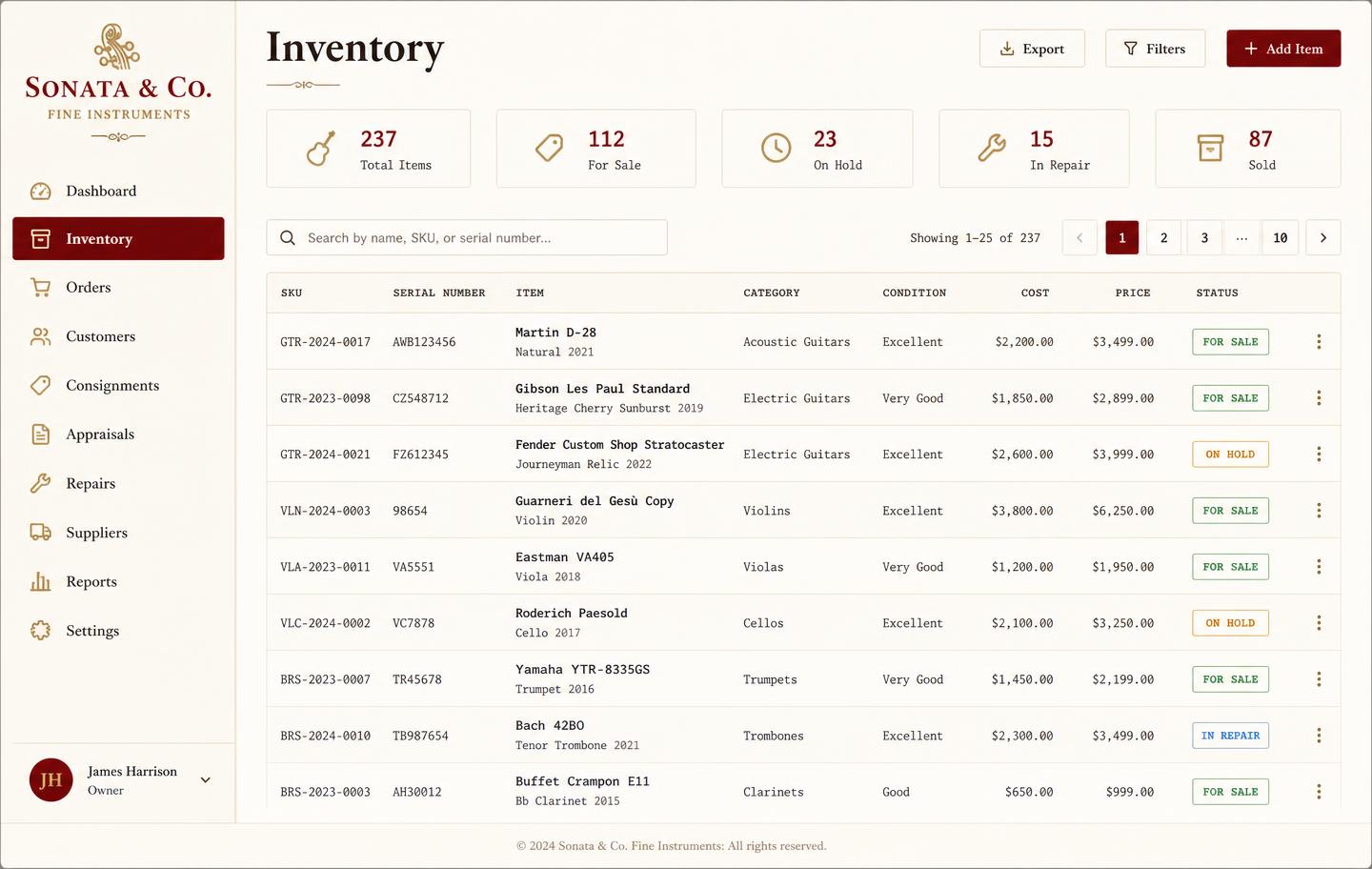
Music shop inventory dashboard listing instruments with SKU, serial number, condition, cost, price and status
InventoryEvery instrument tracked by SKU and serial with condition, cost, retail price, and live status — for sale, on hold, in repair, or sold.
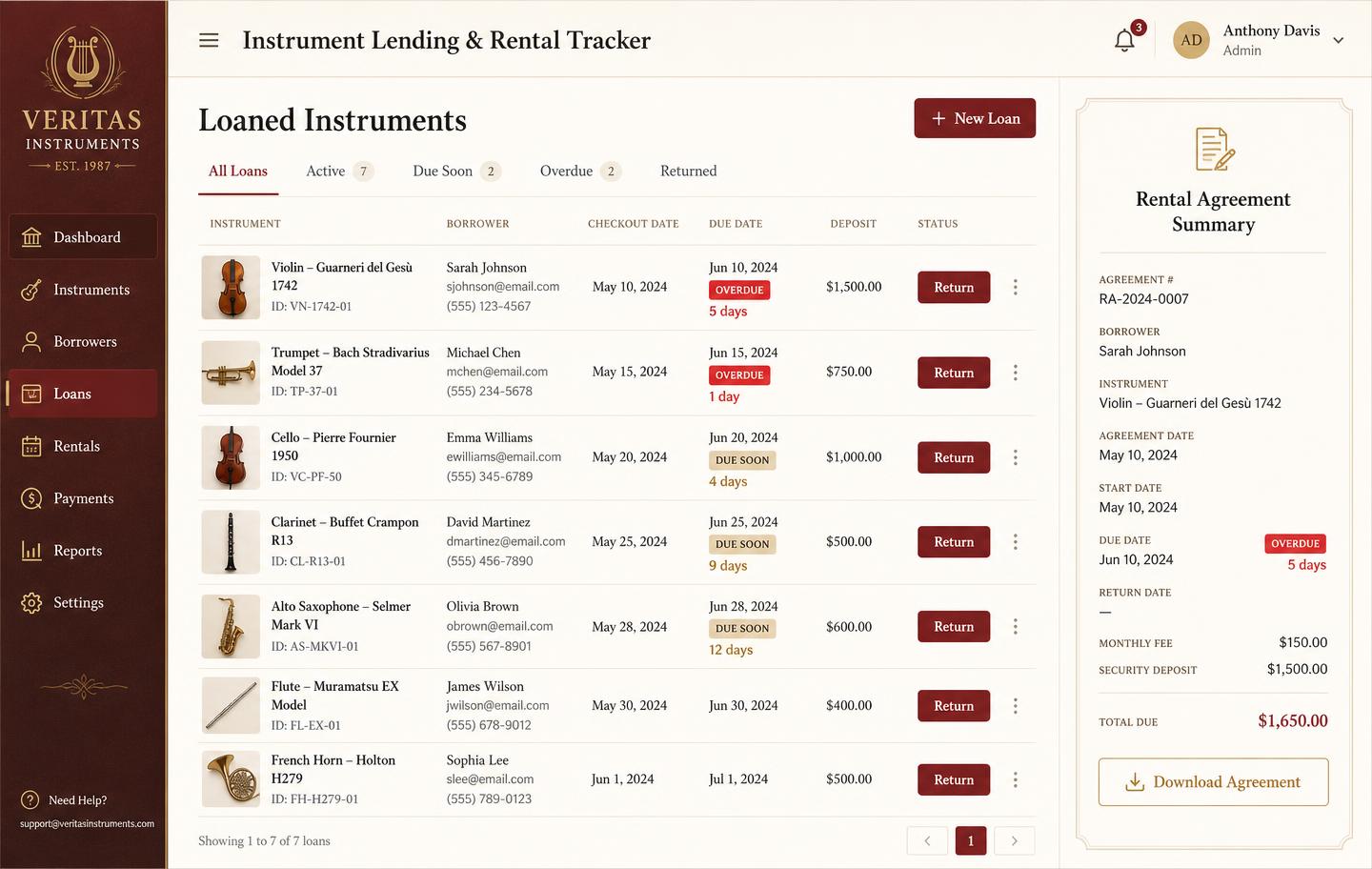
Instrument lending and rental tracker with borrowers, due dates, overdue badges and deposits
Instrument lendingLoans and rentals by unit: who has it, when it is due, what deposit is held, and which agreements are overdue.
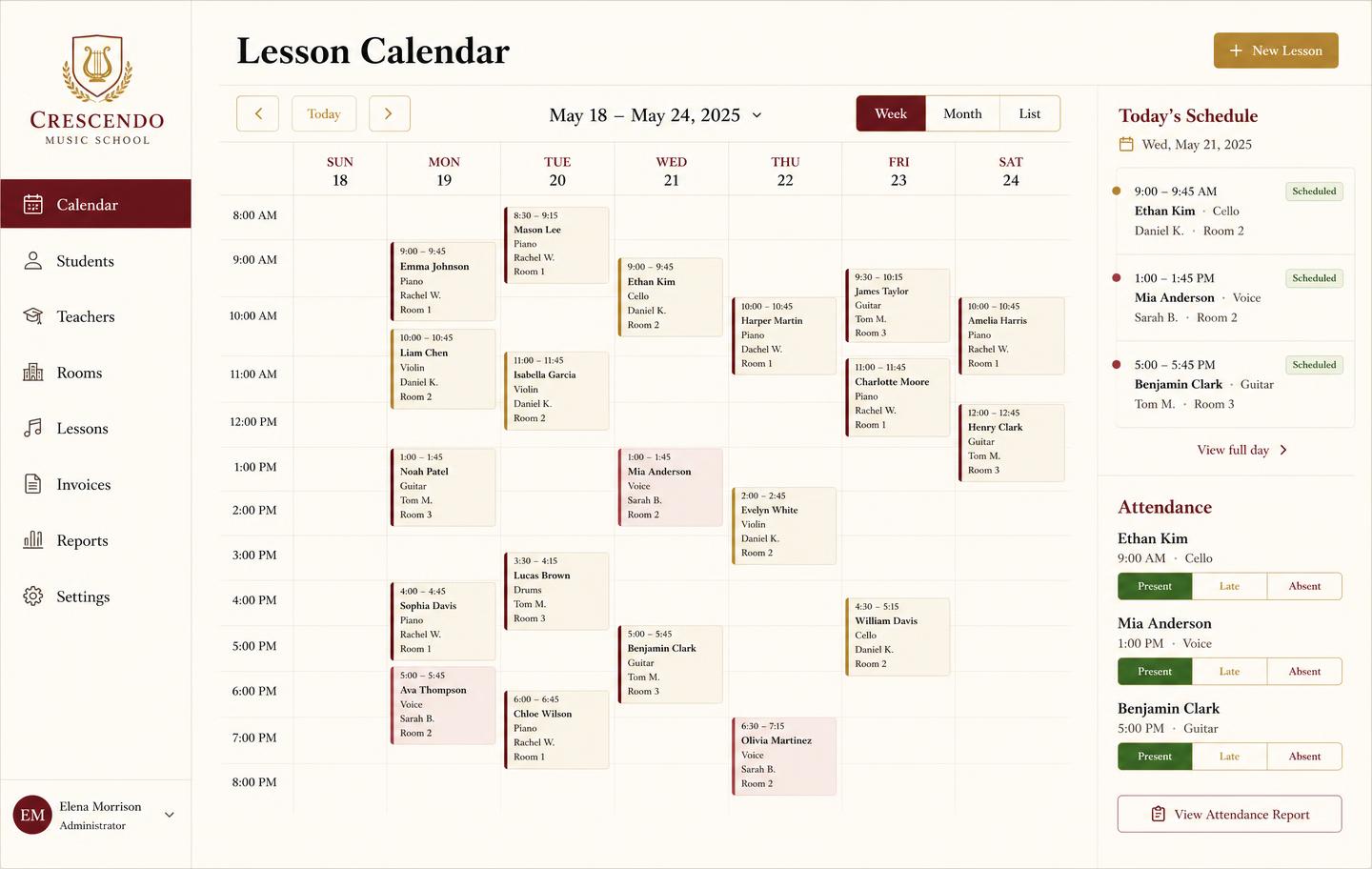
Weekly lesson booking calendar with student lessons, teachers, rooms and attendance
Lesson bookingsA weekly teaching calendar with rooms, teachers, and attendance marking — plus the invoice that follows each lesson block.
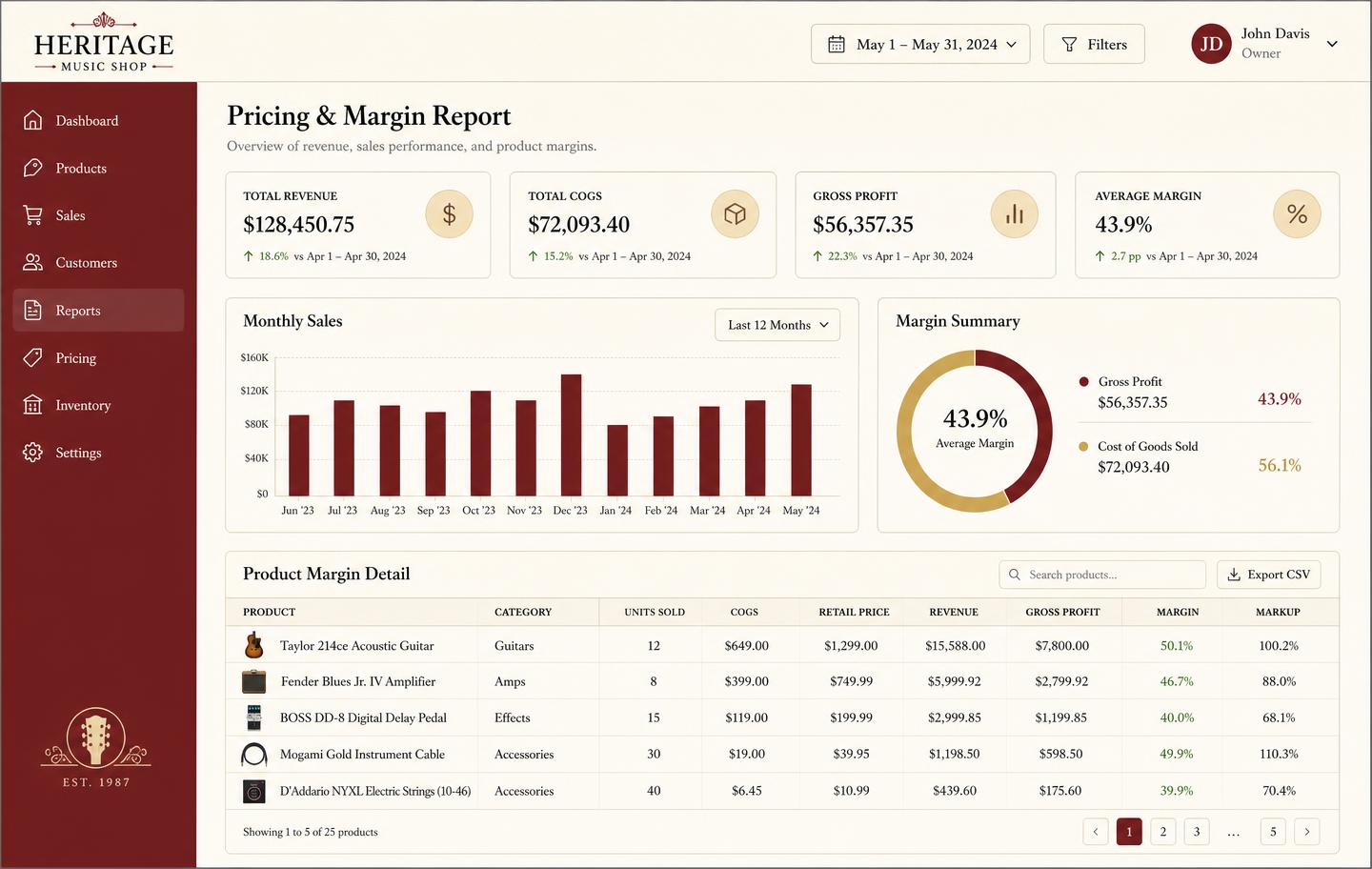
Pricing and margin report showing revenue, cost of goods, gross profit and per-product markup
Pricing & marginRevenue, cost of goods, gross profit, and markup per product so you price from real numbers instead of gut feel.

Honest note

Honest note: we are not a till replacement

Music Shop Suite does not process card payments, drive a cash drawer or print receipts. If Da Capo's counter operation is what you value most, keep a terminal — Square and Lightspeed both do that job cheaply — and use Music Shop Suite behind it for inventory, rentals, repairs, lessons and month-end numbers. That pairing is what most shops who move across actually run.

Frequently asked

What is Da Capo inventory software?
Da Capo is a long-established music retail package used by independent shops for inventory, sales and vendor catalogues. It is a traditional installed retail system, strongest at counter operations and stock lists for a single shop.
Why do shops look for a Da Capo alternative?
Usually three reasons: they want browser access rather than a machine in the back office, they want rentals, repairs and lessons handled as first-class workflows rather than bolt-ons, and they want flat pricing instead of per-terminal licensing plus support contracts.
Is Music Shop Suite a direct Da Capo replacement?
Not for the till. Music Shop Suite does not process card payments or drive a cash drawer. It replaces the inventory, rental, repair, lesson and reporting side, and most shops that switch keep a simple card terminal such as Square for checkout.
Can I move my Da Capo data across?
Yes, via CSV. Export products, customers and stock from your existing system and import them with column mapping. Serial numbers, cost, price and condition map to per-unit records on the way in.
How much does it cost compared to Da Capo?
Music Shop Suite is $49/month flat with unlimited users and every module included. Traditional installed retail packages usually price per terminal with a separate annual support agreement, so the comparison depends on how many machines you run.
Do I need to install anything?
No. It runs in a browser, so the bench tablet, the office desktop and the owner's phone all see the same data with no server in the shop and no backups to remember.

Sign up today

Run your shop on one workbench — starting today.

$49/month, no contracts, no trial. Import your spreadsheet, invite your team, and have inventory, repairs, rentals, and lessons in one place tonight.