My Music Staff review

My Music Staff Review: What It Does Well, and Where Studios Outgrow It

This review is written by a competitor, so read it with that in mind — which is exactly why we have tried to be accurate rather than flattering to ourselves. My Music Staff is a mature, well-liked lesson platform. It is the right choice for a large share of the teachers considering it, and the wrong one for a specific and identifiable group. Here is how to tell which you are.

  • Built for teaching studios: scheduling, students, tuition, parent portal
  • Priced by active student count, in tiers
  • Strongest feature: mature automatic tuition collection
  • Main gap: no serialized instruments, rentals or repair work orders
  • Outgrown by: multi-teacher studios and studios inside music shops

What it genuinely does well

The billing loop is the strongest part of the product. Attendance flows into invoices, families can log in and pay, and the studio owner spends less time chasing money — which is the main administrative burden of teaching-only studios.

  • Parent portal with self-service scheduling views
  • Automatic tuition collection
  • Mature, well-documented, large user base

Where the pricing model bites

Per-student tiers are cheap at twenty students and meaningful at two hundred. The cost rises with roster size rather than with profit, so it grows fastest exactly when a studio is adding teachers and margins are thinnest.

The gap: physical objects

Nothing in the platform models an instrument as an asset. If the studio owns a fleet, rents units to students, or repairs them, that entire side of the operation lives outside the system.

  • No serial-level instrument records
  • No rental contract with deposit and due date
  • No repair queue, parts or labour tracking

Room scheduling is teacher-first

For a single-room studio this is irrelevant. For a school with several studios and overlapping teachers, room conflict is the constraint that actually breaks, and teacher-centric calendars handle it awkwardly.

Who should stay

Teaching-only studios where parents pay automatically through the portal. Switching away from that would cost you a feature we do not currently match, in exchange for capabilities you would not use.

Who tends to leave

Multi-teacher schools with rooms, studios with an instrument fleet, and teaching operations that sit inside a music shop with retail, rentals and a bench.

My Music Staff at a glance

What the platform covers, and what usually ends up in a spreadsheet beside it.

My Music Staff at a glance
AreaCovered by My Music StaffNotes
Lesson schedulingYesRecurring slots and per-teacher calendars
Student and family recordsYesFamily grouping and contact history
AttendanceYesFeeds the billing flow
Tuition invoicing and autopayYes — its strongest areaParent-facing portal included
Teacher payroll reportingYesPer-teacher revenue and pay
Room schedulingLimitedTeacher-centric rather than room-centric
Serialized instrument fleetNoUsually a spreadsheet
Rental contracts per unitNoUsually a spreadsheet
Repair work ordersNoUsually paper tickets
Retail stock and marginNoOut of scope by design

Feature coverage described from publicly documented functionality; pricing tiers change, so check current rates directly.

How to review any studio platform without being sold to

Feature grids are designed to be won, which is why every platform's grid shows it winning. A more reliable method is to describe your three most annoying recurring admin tasks in concrete terms and ask each vendor to walk through them live, including the awkward variations.

For teaching businesses, three cases separate products quickly. A student cancels with two hours' notice and your policy credits half — what happens to the invoice? Two teachers need the same room at five on Thursday — is that prevented or discovered? A family rents a school instrument and owes tuition — can you see both on one screen?

Any platform will answer the first well. The second and third are where categories diverge, and the answers tell you which category you are actually shopping in.
The hidden cost of the spreadsheet beside the platform

Studios that use a lesson platform plus a spreadsheet rarely count the spreadsheet as a cost, because it is free and it has always been there. But it is where the fleet lives, and the fleet is usually the studio's second largest asset after the premises.

The cost shows up in three places. Instruments that quietly stop being accounted for. Repairs paid for out of general expenses so nobody knows what the fleet costs to maintain. And an insurance schedule that has to be rebuilt from memory whenever it is questioned.

None of these are urgent, which is why they persist for years. They are also each larger than the difference in software subscription that usually triggers the search in the first place.

A fair way to make the decision

Count what proportion of your administrative time involves a physical object rather than an appointment or an invoice. Instruments checked out, returned, repaired, audited, insured, or argued about.

If that proportion is under a tenth, a dedicated lesson platform is the correct category and My Music Staff is a strong choice within it. Adding a back-office system would give you capabilities you do not need and cost you a parent portal you do.

If it is a third or more, you are running two businesses on one and a half systems, and consolidating is worth more than any scheduling feature comparison. Our feature-by-feature comparison and our switching guide set out what that move involves in practice.

See the workbench before you sign up

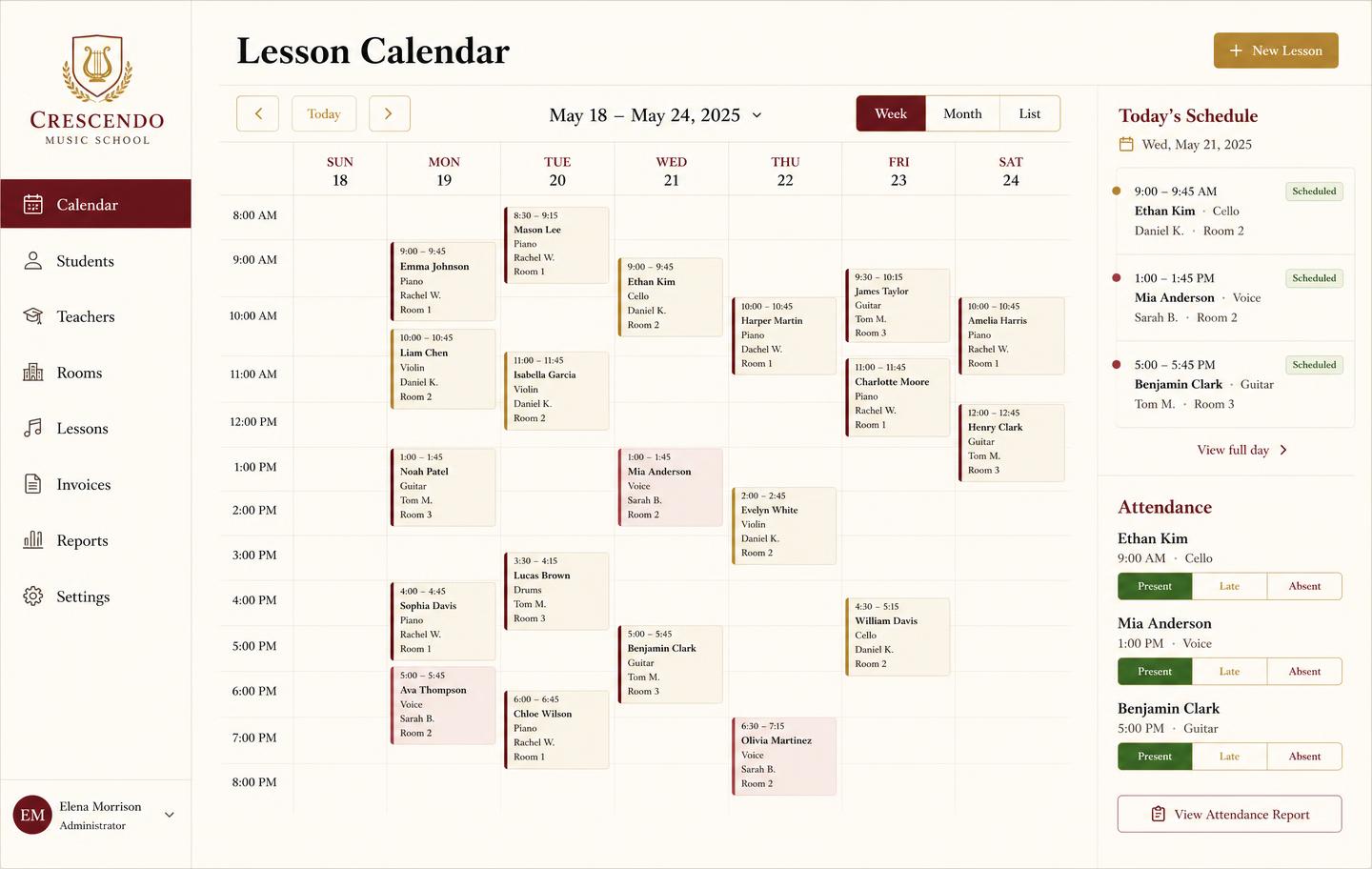
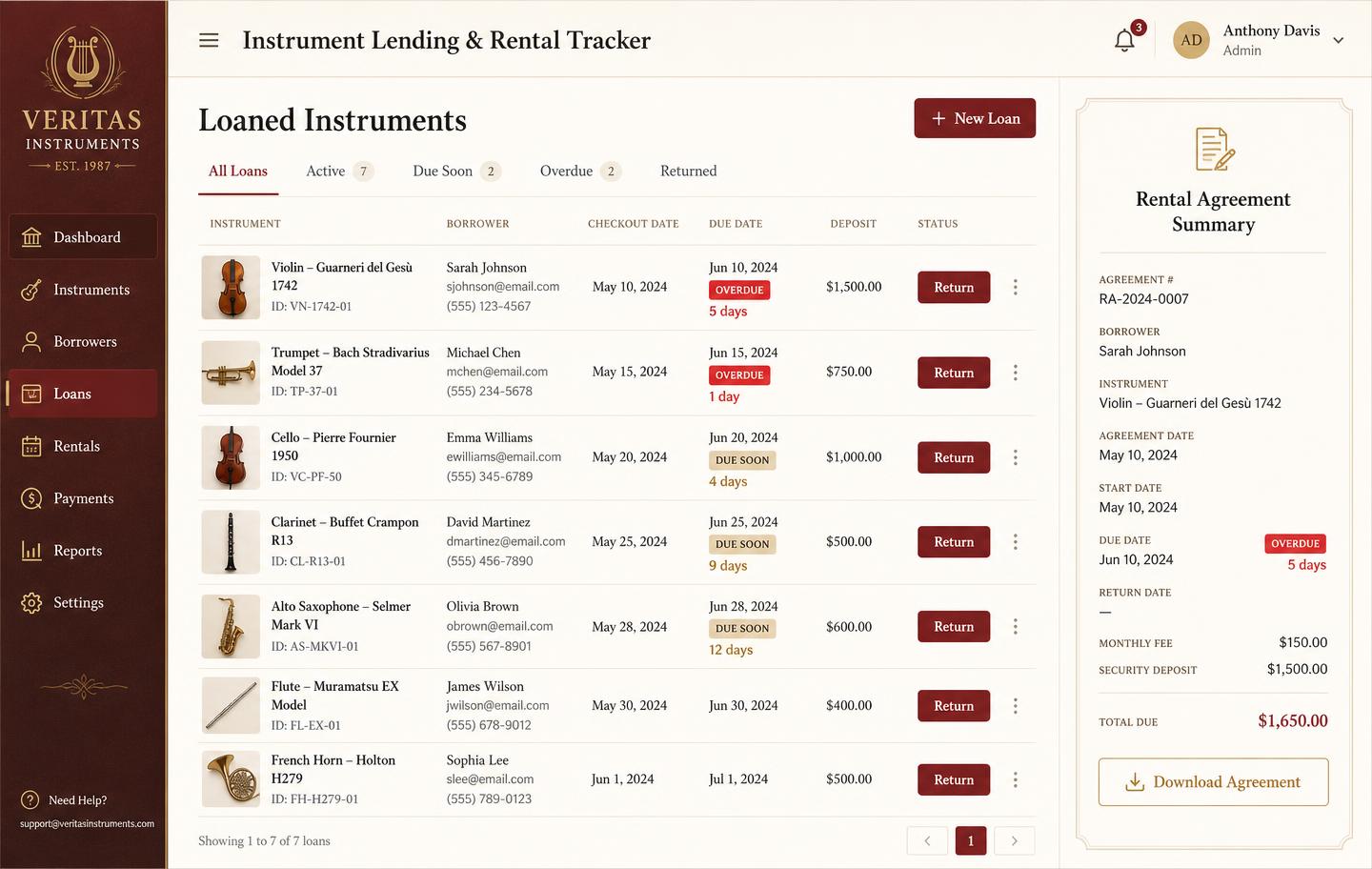
Inventory, pricing, lesson bookings, and instrument lending all live in the same back-office dashboard — no separate apps, no re-keying between them.

Weekly lesson booking calendar with student lessons, teachers, rooms and attendance
Lesson bookingsA weekly teaching calendar with rooms, teachers, and attendance marking — plus the invoice that follows each lesson block.
Instrument lending and rental tracker with borrowers, due dates, overdue badges and deposits
Instrument lendingLoans and rentals by unit: who has it, when it is due, what deposit is held, and which agreements are overdue.

Honest note

Disclosure

Music Shop Suite competes with My Music Staff for part of its market, and we would obviously prefer you chose us. We have written this review to be useful rather than persuasive, including recommending that teaching-only studios reliant on parent autopay stay where they are. Feature descriptions reflect publicly documented functionality and may change.

Frequently asked

What is My Music Staff?
My Music Staff is a web-based studio management platform for music teachers. It handles lesson scheduling, student and family records, attendance, tuition invoicing, and a parent-facing portal, and it prices by active student count.
Who is My Music Staff best for?
Solo teachers and teaching-only studios. Its strongest features — the parent portal, automatic tuition collection, and a mature billing flow — matter most when teaching is the entire business.
What does My Music Staff not do?
It does not track physical instruments as serialized assets, run rental contracts against specific units, or manage repair work orders. Studios inside a music shop typically keep a spreadsheet alongside it for those.
How is it priced?
By active student count, in tiers. That model is inexpensive for small rosters and rises as the studio grows, which is the most common reason larger studios start looking at alternatives.
What should I compare it against?
Compare it against other dedicated lesson platforms if you teach only. Compare it against a back-office system if your studio also owns a fleet, rents instruments, or repairs them — those are different categories, not competing products.

Sign up today

Run your shop on one workbench — starting today.

$49/month, no contracts, no trial. Import your spreadsheet, invite your team, and have inventory, repairs, rentals, and lessons in one place tonight.